Forum Discussion

Passkey Sign in Method (Entra Account) missing in Security
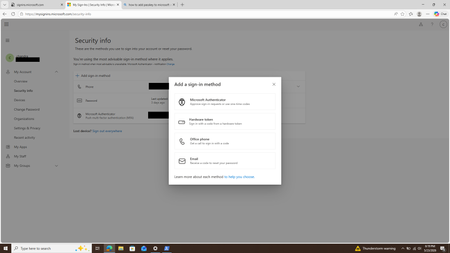
- May 26, 2026
Hi Chandra,
For Entra ID accounts, I would check the Authentication Methods policy first.
In the Entra admin center, go to:
Protection > Authentication methods > Policies > Passkey (FIDO2)
Make sure that:
- Passkey (FIDO2) is enabled.
- The user is included in the target group.
- “Allow self-service set up” is set to Yes.
- If you are using passkey profiles, the correct profile is assigned.
- The user is using the work/school Security Info page, not the personal Microsoft account page.
The registration page should be:
https://mysignins.microsoft.com/security-info
Then select:
Add sign-in method > Passkey
If “Allow self-service set up” is disabled, users may not see the Passkey option in Security Info even if Passkey (FIDO2) is enabled in the tenant.
Microsoft documentation:
https://learn.microsoft.com/en-us/entra/identity/authentication/how-to-authentication-passkeys-fido2
https://learn.microsoft.com/en-us/entra/identity/authentication/how-to-register-passkey


Hi Lucaraheller DerekMorgan2
We enabled all the settings as mentioned by you. This was not apparently the issue.
Auth Mehotds -> Passkeys (FIDO2). It seems adding user to a particular group and enabling was not effective. When All Users was selected, the Passkeys are now visible back in my account.
This can be closed.
Thanks
Chandra