Forum Discussion

Taen keren
Oct 14, 2019Steel Contributor
No reports available
Hi have a dev tenant - but there are no Reports available in the Security & Compliance center - I'm global admin - what am I doing wrong?
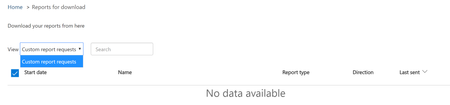
- Oct 14, 2019Hi Taen keren,
Follow this guide, and it should populate. The tenant I tested on had nothing in either and this worked
https://docs.microsoft.com/en-us/microsoft-365/security/office-365-security/set-up-and-download-a-custom-report
1.) Go to Reports > Dashboard
2.) Select one of the cards by clicking on it - for example I picked DLP Policy Matches
3.) Select Request Report
4.) You will fill out some details on the report
5.) A copy will be sent to the admin and a copy will be downloadable from Reports > Reports for Download
Hope that answers your question!
Best, Chris

Oct 14, 2019
Hi Taen keren,
Follow this guide, and it should populate. The tenant I tested on had nothing in either and this worked
https://docs.microsoft.com/en-us/microsoft-365/security/office-365-security/set-up-and-download-a-custom-report
1.) Go to Reports > Dashboard
2.) Select one of the cards by clicking on it - for example I picked DLP Policy Matches
3.) Select Request Report
4.) You will fill out some details on the report
5.) A copy will be sent to the admin and a copy will be downloadable from Reports > Reports for Download
Hope that answers your question!
Best, Chris
Follow this guide, and it should populate. The tenant I tested on had nothing in either and this worked
https://docs.microsoft.com/en-us/microsoft-365/security/office-365-security/set-up-and-download-a-custom-report
1.) Go to Reports > Dashboard
2.) Select one of the cards by clicking on it - for example I picked DLP Policy Matches
3.) Select Request Report
4.) You will fill out some details on the report
5.) A copy will be sent to the admin and a copy will be downloadable from Reports > Reports for Download
Hope that answers your question!
Best, Chris