Forum Discussion

James Lin
Jun 24, 2018Tin Contributor
Azure RMS templates not always applied.
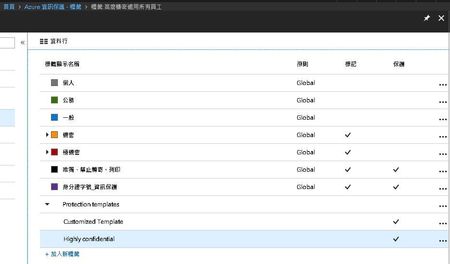
Why I have two RMS template but can't Applied to Mail flow. I had study https://docs.microsoft.com/zh-tw/azure/information-protection/understand-explore/what-is-information-protection ,can't find t...

Carol Bailey Microsoft
Jun 25, 2018MicrosoftAre these two templates scoped to specific users or groups? It's hard
for me to tell from the screenshot but that's the first thing that comes
to mind why you wouldn't be able to see them in Exchange Online (mail
flow rules or Outlook on the web) but the specified users can see them
in their Office apps. The other possibility is that your tenant isn't
yet configured for Office 365 Message Encryption new capabilities, which
also automatically makes these templates available to Exchange Online
(see
https://docs.microsoft.com/en-us/azure/information-protection/deploy-use/refresh-templates).
To check, run Get-IRMConfiguration to confirm that
AzureRMSLicensingEnabled is set to True.
 James LinJun 25, 2018Tin Contributor
Hi, Carol Bailey
Thank you for providing the requested information.,
- I have enable AIP service
- Exchange Online:Automatically refreshed within an hour - no additional steps required.
- these two templates are scoped to specific two users(o365 E5 Authorized)