Forum Discussion

Azure information protection custom policies not working
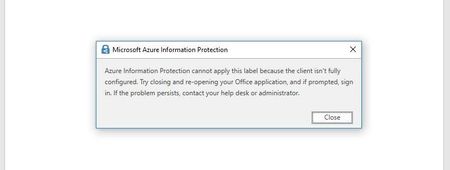
- Jan 18, 2018
In addition to checking the firewall isn't blocking IP addresses and URLs, check it's not terminating your TLS connection, which breaks certificate pinning. I've added a tip how to check for this client-side, if you don't manage the firewall yourself. See https://docs.microsoft.com/en-us/information-protection/get-started/requirements#firewalls-and-network-infrastructure


Good, I would check that Azure RMS Service and Templates in Azure portal, just to make sure everything is OK there. After that you can refresh templates on your machine following these steps:
https://docs.microsoft.com/en-us/information-protection/deploy-use/refresh-templates

Unfortunately I see nothing wrong with the templates. I wonder, is there anything within Office 365 setup that could be interfering with Azure RMS?
Only the firewall left to be check.
- JeremyLeirmoMar 05, 2019Copper Contributor
Thanks for the info, this pointed me to my problem
- Carol BaileyJan 19, 2018
Microsoft
Thanks for the update - really appreciate that, and also knowing that the newly added tip in the documentation worked for you. Hopefully, it will help the next person as well!
Firewall issues are always tricky to pin down, with unpredictable symptoms. Then the problem is compounded when you don't manage the firewall yourself and have to rely on others to check the requirements for you and make changes. This tip that was passed on to me (by Tom Moser in our Customer Success team) is a great way to either help eliminate this possible cause, or provide specific information to whoever manages your firewall.
- Ion ZubiaJan 19, 2018Brass Contributor
Hi Carol,
Spot on, the Microsoft certificate isn't displayed and in fact I can view a Fortinet message instead.
I also got a message from our vendor stating that they think something in the list might be performing packet inspections.
Once this is sorted I'll get back with more information to leave a record of it in case someone in the future runs into this post with a similar problem.
My most sincere thanks for all the assistance.
EDIT: The firewall was simply intercepting the SSL stream and replacing the certificate with its own. - Carol BaileyJan 18, 2018
In addition to checking the firewall isn't blocking IP addresses and URLs, check it's not terminating your TLS connection, which breaks certificate pinning. I've added a tip how to check for this client-side, if you don't manage the firewall yourself. See https://docs.microsoft.com/en-us/information-protection/get-started/requirements#firewalls-and-network-infrastructure
- Ion ZubiaJan 18, 2018Brass ContributorUnfortunately the firewall is outside of my control and I'm awaiting for our vendor's response still.
Answering your question: Yes, we do have the needed licenses. I have also gone thru all of the requirements and setup again to make sure I haven´t missed something previously. I'll come back with an update (and hopefully a solution) to this post once the Firewall is sorted.
Again, thanks for the help!
Regards,
Ion - Pablo R. OrtizJan 18, 2018Steel Contributor
I assume your Office 365 license supports Azure RMS, right?
If so, then most likely it's firewall or proxy blocking IPs or URLs like azurerms.com
