Forum Discussion

Pogo947
Oct 09, 2023Copper Contributor
WIN32 App Install error 0x80070002
I have an app that I am trying to add to Company Portal. No matter how I try to install it (using a powershell script to call the executable, calling the executable itself, and even using a .cmd to c...

Pogo947
Oct 09, 2023Copper Contributor
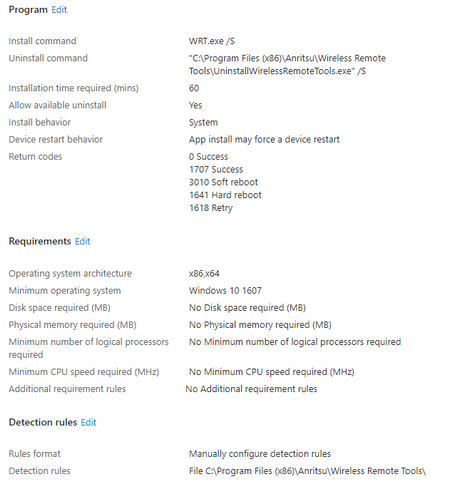
On my local machine, if I run WRT.exe /S, the app will successfully install (silently). It is being installed to C:\Program Files (x86)\Anritsu\Wireless Remote Tools\, and yes, that path is being used in the detection rule.
Could using where the file will be installed to in the detection rule be the issue?
Could using where the file will be installed to in the detection rule be the issue?

Oct 09, 2023
No thats correct the path of the installation should in the path section and the name of the exe file so intune can detect when the app.is installed. Something is blocking intune from extracting the package on the device ... any thrid party antivirus ?
- Oct 09, 2023Try to change the detection method to a registery file for example and check if the app get installed even if not detected seems there is a case sensitive with the install command for this app . Also you can check IntuneManagementExtension.log while the app is deoyed to check if the installation command is the cause behind this error
- Pogo947Oct 09, 2023Copper ContributorWell here is the next conundrum. "/S" causes the apps UI to pop up and require user intervention, which was never a behavior I got before.
- Pogo947Oct 09, 2023Copper ContributorThe crazy part is that it is extracting it. I can go to the IMECache folder during its attempt at installation and see the installer file. I even managed to run the installer from within the IMECache.
- Oct 09, 2023Can you please the install command : WRT.exe "/S"