Forum Discussion

JuliusPIV
Sep 30, 2021Brass Contributor
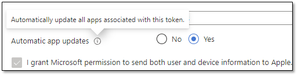
VPP Apps on DEP iPadOS Devices Do Not Automatically Update Error code: 0x87D13B9F
We're in the process of migrating to Intune and we're starting with DEP devices. However we've noticed that as applications are updated in the App Store, the device itself is not updating the applic...

JuliusPIV
Oct 06, 2021Brass Contributor
I definitely can't remove that filter for those devices as it would then incorrectly apply the software to devices that should not receive it. I'm thinking I'm going to have to open a case with Microsoft for this one as it's not really jumping out at any of us.

T_Kuisma
Oct 06, 2021Brass Contributor
What if you create another required assignment and target an AzureAD group with just a few devices in it? If those get updated automatically, then it's probably the filter.
 MarkTheITGuyNov 07, 2021Copper ContributorWe're seeing a similar thing. Been working fine for months. Now all of a sudden, Apps, that would usually update automatically, are not.
These are pushed as required apps, with no filters on the assignments.
Only happening on a handful of apps, not all. All apps are deployed via VPP and Devices enrolled via DEP.
We only noticed this a couple of days ago.
Interested to see if you get any success. GaryHerbstmanDec 06, 2021Brass ContributorWe are seeing the same issue.
- MarkTheITGuyDec 09, 2021Copper Contributor
GaryHerbstman Check your Apple VPP Token in Endpoint manager.
Even though ours was showing as active, when we drilled in to it, the token state was showing as 'Inactive'
Turns out our issue was that for some reason, we were using the same VPP token in 2 MDM Solutions, so had to create a secondary token so we had one for each MDM.
As soon as we did that, the apps started to update.Might not be the same for you, but this solved our issue.