Forum Discussion

Sk-73
Apr 11, 2022Iron Contributor
Uninstall Google Chrome
Dear all, Can I check here, how can we uninstall/remove the Chrome browser by Intune? What I've tried: Previously, I created a Google Chrome App configuration profile, to push to all the devices. ...
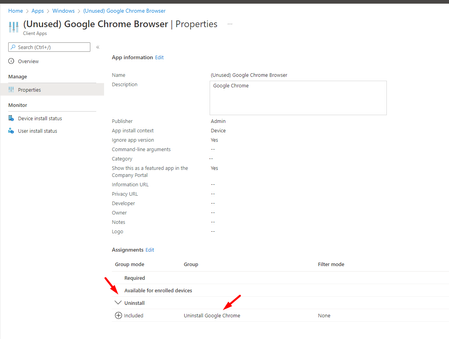
- Apr 12, 2022Hi, normally the option you have chosen, should work. Thats also the first one I would try. Another possibility would be a powershell script or maybe even better convert this one to a proactive remediation script!
$SEARCH = 'chrome$'
$INSTALLED = Get-ItemProperty HKLM:\Software\Microsoft\Windows\CurrentVersion\Uninstall\* | Select-Object DisplayName, UninstallString
$INSTALLED += Get-ItemProperty HKLM:\Software\Wow6432Node\Microsoft\Windows\CurrentVersion\Uninstall\* | Select-Object DisplayName, UninstallString
$RESULT = $INSTALLED | ?{ $_.DisplayName -ne $null } | Where-Object {$_.DisplayName -match $SEARCH }
if ($RESULT.uninstallstring -like "msiexec*") {
$ARGS=(($RESULT.UninstallString -split ' ')[1] -replace '/I','/X ') + ' /q'
Start-Process msiexec.exe -ArgumentList $ARGS -Wait
} else {
$UNINSTALL_COMMAND=(($RESULT.UninstallString -split '\"')[1])
$UNINSTALL_ARGS=(($RESULT.UninstallString -split '\"')[2]) + ' --force-uninstall'
Start-Process $UNINSTALL_COMMAND -ArgumentList $UNINSTALL_ARGS -Wait
}

Apr 12, 2022
Hi, normally the option you have chosen, should work. Thats also the first one I would try. Another possibility would be a powershell script or maybe even better convert this one to a proactive remediation script!
$SEARCH = 'chrome$'
$INSTALLED = Get-ItemProperty HKLM:\Software\Microsoft\Windows\CurrentVersion\Uninstall\* | Select-Object DisplayName, UninstallString
$INSTALLED += Get-ItemProperty HKLM:\Software\Wow6432Node\Microsoft\Windows\CurrentVersion\Uninstall\* | Select-Object DisplayName, UninstallString
$RESULT = $INSTALLED | ?{ $_.DisplayName -ne $null } | Where-Object {$_.DisplayName -match $SEARCH }
if ($RESULT.uninstallstring -like "msiexec*") {
$ARGS=(($RESULT.UninstallString -split ' ')[1] -replace '/I','/X ') + ' /q'
Start-Process msiexec.exe -ArgumentList $ARGS -Wait
} else {
$UNINSTALL_COMMAND=(($RESULT.UninstallString -split '\"')[1])
$UNINSTALL_ARGS=(($RESULT.UninstallString -split '\"')[2]) + ' --force-uninstall'
Start-Process $UNINSTALL_COMMAND -ArgumentList $UNINSTALL_ARGS -Wait
}
$SEARCH = 'chrome$'
$INSTALLED = Get-ItemProperty HKLM:\Software\Microsoft\Windows\CurrentVersion\Uninstall\* | Select-Object DisplayName, UninstallString
$INSTALLED += Get-ItemProperty HKLM:\Software\Wow6432Node\Microsoft\Windows\CurrentVersion\Uninstall\* | Select-Object DisplayName, UninstallString
$RESULT = $INSTALLED | ?{ $_.DisplayName -ne $null } | Where-Object {$_.DisplayName -match $SEARCH }
if ($RESULT.uninstallstring -like "msiexec*") {
$ARGS=(($RESULT.UninstallString -split ' ')[1] -replace '/I','/X ') + ' /q'
Start-Process msiexec.exe -ArgumentList $ARGS -Wait
} else {
$UNINSTALL_COMMAND=(($RESULT.UninstallString -split '\"')[1])
$UNINSTALL_ARGS=(($RESULT.UninstallString -split '\"')[2]) + ' --force-uninstall'
Start-Process $UNINSTALL_COMMAND -ArgumentList $UNINSTALL_ARGS -Wait
}
- Sk-73Apr 12, 2022Iron Contributor
The script I created apply to my colleague device is still failed.
 But my device this time round still succeeded. I checked my machine, cannot find the Chrome anymore.
Wondering to know, in future, if my device still want to install Chrome, is it I must create a new group assign to exclude? Or I need to create another script to allow me install the Chrome?
- Apr 12, 2022Yhis powershell script is only run once... so if you reinstall it again... it will still be installed.
When converting it to a proactive remediation... you could rerun it each hour to detect and uninstall it.. (targeting at a specific group)- Sk-73Apr 12, 2022Iron Contributor
Hi,Rudy_Ooms_MVP Can I check with you, how to converting it to a proactive remediation?
- Sk-73Apr 12, 2022Iron Contributor
Hi Rudy_Ooms_MVP Thanks! I have remove the group from the App configuration profile. I created a script profile.
I will update u with the outcome. Cheers 👍
 Kashish_GoyalNov 08, 2023Tin ContributorHi Rudy,
This script does not remove the exe for Chrome.
Any suggestions?
Regards rahuljindalNov 08, 2023Bronze ContributorWhich exe? Which part of the script is not working? If there are limited number of versions installed then you can simplify the script and just use uninstall strings in one liners in form of msiexec /x {guid} /qn
