Forum Discussion

Unable to deploy Windows Defender Application Guard via Intune

Hello Eli,
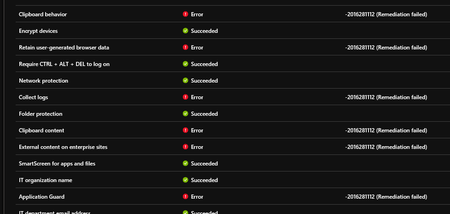
I created a policy for endpoint protection from Intune and defined the settings there. Like I mentioned the devices did NOT have WDAG enabled until I deployed this policy to a group of devices. It does enable WDAG on them, but result in the failed remediation in the screenshot in the original post.

Hi Alex,
If you don't have any warning or errors on debug log please check the following points:
- Make sure your system requirement is ok against WDAG system requirements
- Configure WDAG with a local policy to make sure that you don't have any other issues
- Enable Audit for WDAG (with AuditApplicationGuard) and check event logs
- Optional: If you can check the WDAG on Windows 10 1709 to with same settings and compare findings
Eli.
- Alex MelchingOct 01, 2018Iron Contributor
Yes, local policy is my next option to try. These are brand new Microsoft Surface devices.
 John MurphyOct 16, 2018Copper Contributor
Hello Any news would be good news. I am having exact issue but I am using Windows 10 Insider Preview 18252 - all on Microsoft SurfaceBook and Surface 5. I have noticed that if you just enable application Guard and leave all other settings not configured then I still get -2016281112 (Remediation failed)
- Eli ShlomoOct 18, 2018MVP
Hi,
Make sure to enable Audit for WDAG (with AuditApplicationGuard) and check event logs. If you can share the log it will be useful.
Thanks,
Eli.