Forum Discussion

Unable to deploy Windows Defender Application Guard via Intune
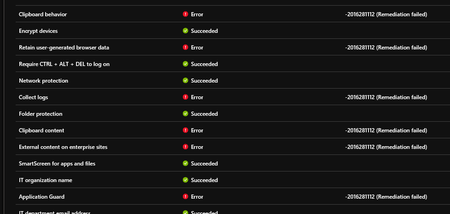

Hi,
How did you deploy the configuration policy via device configuration or with specific settings with OMA-URI's (for example like settings in device guard)?
Remediation failed error message returned by the client when the SET command on the OMA-URI’s required to configure the target setting. In your case, the OMA-URI's didn't succeed.
The remediation error code 201*** is very general therefore you can do the following actions:
- Troubleshoot error from Windows 10 device
- Once you've some information change your settings
Eli.
- Alex MelchingSep 30, 2018Iron Contributor
Hello Eli,
I created a policy for endpoint protection from Intune and defined the settings there. Like I mentioned the devices did NOT have WDAG enabled until I deployed this policy to a group of devices. It does enable WDAG on them, but result in the failed remediation in the screenshot in the original post.
- Eli ShlomoSep 30, 2018MVP
Hi Alex,
If you don't have any warning or errors on debug log please check the following points:
- Make sure your system requirement is ok against WDAG system requirements
- Configure WDAG with a local policy to make sure that you don't have any other issues
- Enable Audit for WDAG (with AuditApplicationGuard) and check event logs
- Optional: If you can check the WDAG on Windows 10 1709 to with same settings and compare findings
Eli.
- Alex MelchingOct 01, 2018Iron Contributor
Yes, local policy is my next option to try. These are brand new Microsoft Surface devices.
