Forum Discussion

Starting Wait for ODJ Blob
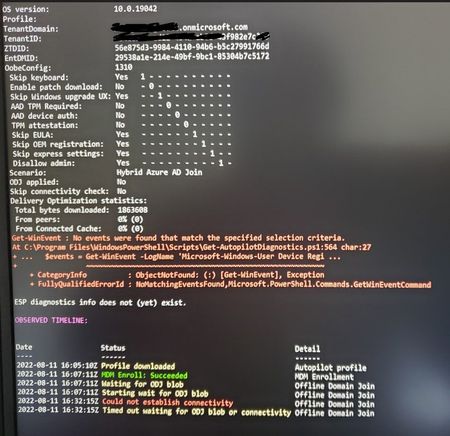
- Aug 12, 2022The laptop has a connection to Endpoint Manager, gets the enrollment profile and the Intune connector is listening for Hybrid Join events. If needed, it will do an Offline Domain Join by sending the computer account blob to Endpoint Manager which sends it to the client. There is no direct connection between the laptop and Intune Connector needed,
Does the server which runs the Intune Connector have internet access to all the URLs mentioned in the deployment guide?


Yes, I do see I am sorry have too many stuff going on. I see that there is event ids
30122 OdjRequestHandlingDownloadPipe
30132 OdjRequestBlobFailure
30122
ODJRequestHandlingPipelineDownload_Failure: Failed to download ODJ requests.
InstanceId:We are unable to complete your request because a server-side error occurred. Please try again. [Exception Message: "DiagnosticException: 0x0FFFFFFF. We are unable to complete your request because a server-side error occurred. Please try again."] [Exception Message: "DiagnosticException: 0x0000040C. HTTP connection timed out. Check Firewall ports or Proxy settings if exist."] [Exception Message: "odjHttp.Call failed. activityId=c434c6dd-0ba0-416a-9e61-b257eb259cca parameters={"options":{"batchSize":null,"connectorBuildVersion":"6.2204.38.3","connectorName":"INCONSERVER"}}"] [Exception Message: "Failed to send http request to uri=https://fef.amsua0202.manage.microsoft.com/TrafficGateway/TrafficRoutingService/RAODJPlus/StatelessODJService/odjConnector/acquirePendingRequests method=POST"] [Exception Message: "An error occurred while sending the request."] [Exception Message: "Unable to connect to the remote server"] [Exception Message: "A connection attempt failed because the connected party did not properly respond after a period of time, or established connection failed because connected host has failed to respond 20.37.153.1:443"],
DiagnosticCode:CBEB90D3-5A20-4109-B8C9-CF3D6B32BF71,
DiagnosticText:Unknown_Error
30132
RequestOfflineDomainJoinBlob_Failure: Failed to generate ODJ blob
RequestId: b47e2875-71ef-4f36-b844-c63861bae6b9
DeviceId: e8a92cc9-c1cd-4b27-98f2-1a23fb49952d
DomainName: xyz.local
RetryCount: 0
ErrorDescription: Failed to call NetProvisionComputerAccount machineName=COMPUTERNAME
InstanceId: CBEB90D3-5A20-4109-B8C9-CF3D6B32BF71
DiagnosticCode: 2050
WinErrorCode: 87
DiagnosticText: Failed to get the ODJ Blob. A parameter is incorrect. [Exception Message: "DiagnosticException: 0x00000802. Failed to get the ODJ Blob. A parameter is incorrect."] [Exception Message: "Failed to call NetProvisionComputerAccount machineName=computername"]
I think I found the solution below. So, I am wondering whether it is the CONFIG file in ODJConnetorEnrollmentWizard.exe.config or is it the ODJCOnnectorSvc.exe.config. I need to read through this more. But, I have my INTUNE CONNECTORS appearing fine there was no issues when I installed it.
I think this URL is not there and we are trying to add it now.
https://fef.amsua0202.manage.microsoft.com/TrafficGateway/TrafficRoutingService/RAODJPlus/StatelessODJService/odjConnector/acquirePendingRequests
Maybe this should fix it.
Symptoms
After you https://docs.microsoft.com/en-us/mem/intune/enrollment/windows-autopilot-hybrid#install-the-intune-connector, it doesn't appear in Intune. Additionally, the following error entry is logged in the ODJ Connector Service event log on the server that hosts the connector:
"DiagnosticText": "We are unable to complete your request because a server-side error occurred. Please try again. [Exception Message: \"DiagnosticException: 0x0FFFFFFF. We are unable to complete your request because a server-side error occurred. Please try again.\"] [Exception Message: \"Failed to get a value for Key: OdjServiceBaseUrl\"] [Exception Message: \"The given key was not present in the dictionary.\"]"
Note
The ODJ Connector Service event logs are located under Application and Services Logs > ODJ Connector Service in the Event Viewer.
Cause
This issue usually occurs when you use a proxy server in your environment. Additional configuration settings are required on the proxy so that the Intune Connector can communicate with the Intune service.
Solution
To fix the issue, add the required proxy configuration to the following files:
- %ProgramFiles%\Microsoft Intune\ODJConnector\ODJConnectorSvc\ODJConnectorSvc.exe.config
- %ProgramFiles%\Microsoft Intune\ODJConnector\ODJConnectorUI\ODJConnectorUI.exe.config
To do this, follow these steps:
Open the .config file. You can see the following lines at the top of the file:
XMLCopy<?xml version="1.0" encoding="utf-8" ?> <configuration>Add the following lines after <configuration>, then save the file.
XMLCopy<system.net> <defaultProxy> <proxy usesystemdefault="false" proxyaddress="http://<proxy server address>:<port>" /> </defaultProxy> </system.net>Restart the Intune ODJConnector Service.
- sgrienenFeb 08, 2023Brass ContributorWe're doing Hybrid Azure AD, VPN is supposed to come in the game AFTER ESP, even if it happens often currently that ODJ is unpredictably failing...
 oryxway390Aug 24, 2022Brass ContributorHarm,
It looks it is very clear for Hybrid Azure AD join that u need to have a VPN. Which kinda is a bummer. Which does not make sense to me at all. But, I had another question in regard to Azure AD Join, which I have sent it to you directly.- Aug 17, 2022That's the purpose, but your client needs to complete the domain join on the machine using the blob file. And it can only do so when in line of sight of the Domain Controllers of your domain.
- oryxway390Aug 17, 2022Brass ContributorIsn't the purpose of Intune Connector for Offline Domain Join to make sure that it can get the domain information and join the domain? Isn't it the reason why this Blob is being send to the device? I am kinda confused on this.
- Aug 17, 2022I guess firewalling issues, but you did change a few things now for your deployment. You could try the office again? And those legacy applications... Are the client/server based? Can you create remote apps from them using RDS? Where is the fileserver data, are you moving to Teams? So many questions making Azure AD or Hybrid Azure AD join the option to choose...
- oryxway390Aug 17, 2022Brass ContributorWe earlier tried another laptop from our office network being inside the office, even that did not go through. So, I am going to try one more time. Well the reason being that there are legacy applications and they want to have it Hybrid AD till we decide to move to Azure AD. How that solves am not sure, I have never done Hybrid AAD, I have come from an AAD environment which was totally managed by Intune.
- Aug 17, 2022Then this is not something that is going to work out for remote users. You will have to either stage them at work or don't use hybrid join.
I think I asked you that question many topics and replies ago, why do you what to hybrid join them? You can access fileservers for example with key trust and kerberos tickets from there on out - oryxway390Aug 17, 2022Brass ContributorI am testing from my home not in office network. These are machines that are going to be shipped to users locations and they just take it out of the box and join.
- Aug 17, 2022That will never work, normal autopilot profiles will work of course but not hybrid join for the reasons in my reply above
- Aug 17, 2022You can only deploy hybrid azure ad machines if they are a network on an office location with direct connection to your Domain Controller, you can't deploy machines at home. There's an exception to that rule, if you have a supported VPN client which can automatically connect to your network.. Then it also works, but the list of VPN suppliers that are supported isn't that big.
So... Can you deploy a windows 10/11 VM in your server network and try that just to see if that works? (Or a desktop/laptop at the office) Where are you testing now? - oryxway390Aug 17, 2022Brass ContributorWell in the case OOBE devices they are not going to be on the network or on VPN, they are going to be joining using Wireless network at users home.
- oryxway390Aug 17, 2022Brass Contributor
I think here is the problem. I see error Event ID 304 and 204 on user device registration event logs. Based on this it says that the device has to be on the internal network or on a VPN. These devices are not internal or in VPN, they are on independent users wireless network.
So, I am wondering whether there is a rule that should be in place for these devices to communicate to the domain controller? I see all the other things happening fine and the device is domain joined.
https://docs.microsoft.com/en-us/azure/active-directory/devices/troubleshoot-hybrid-join-windows-current
Step 4: Check for possible causes and resolutions
Pre-check phase
Possible reasons for failure:The device has no line of sight to the domain controller.
The device must be on the organization's internal network or on a virtual private network with a network line of sight to an on-premises Active Directory domain controller. - Aug 17, 2022If the server which is running the connector service is in the same network/vlan... Then there should not be an issue, what do you see in the eventlog of the server in the OBJ eventlog?
And again... Can the machine you're deploying ping the domain controller when deploying? Is the hybrid join profile assigned to the same group (in which the computer is that you're deploying) and the domain join profile? - oryxway390Aug 17, 2022Brass ContributorI have a Wireshark capture that was running on Intune server and am looking into it. Not sure about the FW, network person did not see anything there I suppose. I think it is possible that there is some issue between the Intune Connector and Domain controller. Any events or event ID that I would see on the DC regarding the blob or Intune specific?
- Aug 17, 2022It needs https access to Microsoft Services I guess, should be in the MS documentation. Does the client have connectivity to your Domain Controllers during deployment? Can you ping your domain controller for example when in a Shift-F10 command-prompt during deployment?
- oryxway390Aug 17, 2022Brass Contributor
So, it failed again at Step 6. The connection to the Internet is wide open between the Intune connector and the Internet. Looks like same thing, and probably it is not getting what it should get from the domain controller. Is there any article what kind of ports should be opened between Domain controller and Intune connector or any specific rules, as our environment is very restricted.
Here’s a description of those numbered steps:
The device will send its hardware hash to the Windows Autopilot services.
If the device is registered with Windows Autopilot and has an Autopilot profile assigned to it, the profile details will be provided to the device. In the Hybrid Azure AD Join case, the profile would tell the device what Azure AD tenant the device is associated with and that the device needs to be joined to Active Directory, but it does not specify the Active Directory domain details.
The user will be prompted for their Azure Active Directory credentials (or if using white glove, the device will perform TPM attestation) to get an Azure AD token; that token will be used to enroll the device in Intune. Intune will be notified as part of the enrollment process that it needs to get the device joined to Active Directory.
Intune will look for a Domain Join device configuration profile assigned to the device (via the groups that device is part of). Assuming it finds one, it will create a request for the Offline Domain Join connector (officially named the “Intune Connector for Active Directory”). If it doesn’t find one, steps #5 and #6 will never happen, and the device will time out waiting for an ODJ blob that will never come.
The ODJ connector picks up the ODJ request from the Intune service (it polls Intune looking for requests). If it finds a request, it will attempt to create an Active Directory object in the specified domain and OU using the naming prefix specified (all from that Domain Join profile). If that succeeds, it will upload the resulting ODJ blob representing that computer account to the Intune service.
When the device performs its next MDM sync (usually every 3 minutes, possibly even more frequently), it will receive that ODJ blob from Intune and apply it to the device. If the “skip connectivity check” setting is specified in the Autopilot profile, the device will immediately reboot to complete the domain join process. If the “skip connectivity check” setting is not specified, or if the device doesn’t meet the requirement for that setting, the device will first try to ping a domain controller for the domain (to ensure connectivity) before rebooting. If that ping test never succeeds, this step will time out and you’ll never get to step #7.
Finally, the user needs to sign into the device using Active Directory credentials, which need to be validated by an Active Directory domain controller, hence connectivity is required at this point; VPN connectivity can be used. See this post for more details on that.
So what can possibly go wrong? There are a few points of failure in this process:
There is no Domain Join profile targeted to the device.
The ODJ connector can’t create the ODJ blob for the device. - Yes
The device can’t establish connectivity. - Yes
The user can’t sign in.
User ESP times out after the user signs in.
Strangely, I routinely see people run into one of these issues and then someone else will say “I’m seeing the exact same problem.” And more often than not, that’s not at all true. Being able to recognize the differences in these different failures is a key troubleshooting skill. You should be able to answer the following questions:Did the ODJ connector process a request and upload a blob for the device? No
Did the device receive and apply the ODJ blob? - No
Did the device try to check connectivity?
If using a VPN connection off the corporate network, can it connect so the user can sign in?
Can the Hybrid Azure AD Join process complete so the user can get an Azure AD user token, needed to talk to Intune and other Azure AD-based services? - Aug 17, 2022This process is pretty fast, the intune connector gets a request and creates and sends a blob almost immediately. You did open internet for testing completely now for the server running the Intune Connector? No errors in the firewall from that server when enrolling a client?
Do you have the Hybrid Azure AD Join profile assigned to the same group in which you assign a Domain Join Profile? - oryxway390Aug 17, 2022Brass ContributorWe have opened it to the internet the 2 Intune servers and I am testing now. But last night in the event log in ODJConnector I see the following:
We do not have a proxy server. I did check the config file in both the ODJConnector as per this document
https://docs.microsoft.com/en-us/troubleshoot/mem/intune/intune-connector-for-ad-not-appear
and also
https://docs.microsoft.com/en-us/mem/intune/enrollment/autopilot-hybrid-connector-proxy
There is no proxy specified in the config file so that I could not even change it to FALSE. It is still spinning and not sure how long it takes for the ODJ blob file to download and set it it up? Usually an hour or less than that?
ODJRequestHandlingPipelineDownload_Failure: Failed to download ODJ requests.
InstanceId:We are unable to complete your request because a server-side error occurred. Please try again. [Exception Message: "DiagnosticException: 0x0FFFFFFF. We are unable to complete your request because a server-side error occurred. Please try again."] [Exception Message: "DiagnosticException: 0x0000040F. HTTP request is unsuccessful."] [Exception Message: "odjHttp.Call failed. activityId=bf9d5706-4b99-4624-86ac-0886888328d6 parameters={"options":{"batchSize":null,"connectorBuildVersion":"6.2204.38.3","connectorName":"MMI-ICS01-CYH"}}"] [Exception Message: "Expected:OK Responded:503 (Service Unavailable)"] [Exception Message: "<!DOCTYPE HTML PUBLIC "-//W3C//DTD HTML 4.01//EN""http://www.w3.org/TR/html4/strict.dtd">
<HTML><HEAD><TITLE>Service Unavailable</TITLE>
<META HTTP-EQUIV="Content-Type" Content="text/html; charset=us-ascii"></HEAD>
<BODY><h2>Service Unavailable</h2>
<hr><p>HTTP Error 503. The service is unavailable.</p>
</BODY></HTML>
"],
DiagnosticCode:CBEB90D3-5A20-4109-B8C9-CF3D6B32BF71,
DiagnosticText:Unknown_Error - Aug 16, 2022You can open the firewall temporarily for the server and see if that fixes it, mostly it's not having TLS1.2 enabled or some kind of inspection of the traffic that the connector doesn't like. And it's server-initiated traffic towards internet, you're not opening the server to the whole world 😉
 mmiadminAug 16, 2022Copper Contributor
Harm_Veenstra No luck that URL was opened up and still cannot complete the process of registering the device. I think the last option is to open up the servers to the internet. Not sure how risky it is going to be. I need to do this to get past this hurdle. I see that there are some red alerts in Wireshark from the capture.
- Aug 15, 2022The server running the intune connector connects to the Microsoft services on the internet and listens from incoming request on hybrid join prife. If it finds one, it requests a computer account and sends the blob data to intune, the computer that's being deployed pulls that data from intune
- oryxway390Aug 15, 2022Brass ContributorWhen you say Internet connectivity is important, do people open up these Intune servers to the INTERNET? Would it not affect the security?
- Aug 15, 2022Hope this works, internet connectivity is very important for the Intune Connector. Otherwise, keep the monitor firewall logging while enrolling a device.
