Forum Discussion

Shandy Tailor
Oct 25, 2022Brass Contributor
Trying to push Notepad++ via InTune but get status of 'Failed'
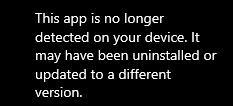
Trying to push latest version of Notepad++ via InTune but keep getting staus of Failed with this When checking Endpoint Manager admin center I see: Any ideas please would help ...
- Oct 30, 2022I think you should use either Win32 packages and keep on superceding the old one with a newer one and uninstalling the previous one. Or use MSI to update

Oct 26, 2022
If you install the old version on a test machine using the same command-line followed by the new version, does it work there?

Shandy Tailor
Oct 26, 2022Brass Contributor
So I managed to install an older version of Notepad++ ok
Then managed to get it updated by changing the Detection rule
- Detection method: String (version)
- Operator: Greater than or equal to
- Value: this I set to 8.4
So, I'm wondering if I do ned to use the "Supersedence" - as that's what I trying before.
What I'd like to do is to use the "Supersedence" to enable updates (this is what I testing with Notepad++) of other applications and don't want to keep changing the Detection values for every app.
- Oct 26, 2022You could do that too, create a new one as supercedence and uninstall the old and install the new one
- Shandy TailorOct 27, 2022Brass Contributor
So can I do the install & the uninstall in the portal app settings, I'd noticed that the uninstall is the bottom section of the Assignments?
- Oct 27, 2022Perhaps this is a nice step-by-step explanation for you? https://www.techuisitive.com/post/intune-upgrade-replace-win32-app-with-supersedence-relationship , it describes a Notepad++ upgrade