Forum Discussion

unslog
Nov 25, 2024Brass Contributor
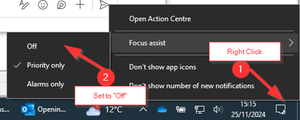
How to centrally switch off Focus Assist / Do not disturb
Hello, Please advise if it’s possible to push out a policy or reg edit script that will completely switch off Focus Assist (Windows 10) or Do not Disturb (Windows 11) ? This is causing havoc ...

iu360
Dec 02, 2024Copper Contributor
Helllo
To disable Focus Assist or Do Not Disturb across multiple devices, you can deploy Group Policy or Intune configurations. Since the settings are typically user-specific, a registry modification targeting HKEY_CURRENT_USER might work. For Windows 10 and Windows 11, creating an automated solution via Group Policy or startup scripts can help manage this across numerous endpoints, ensuring users do not need to manually disable the feature. This approach allows for a more centralized, streamlined process in large-scale environments.

unslog
Dec 28, 2024Brass Contributor
Hello.
PLease can you advise the registry settings or intune policy that actually work? I have tried both options in this thread as suggested by kyazaferr, none of which worked. thanks