Forum Discussion

Most Systems Not Installing Updates Via WUfB
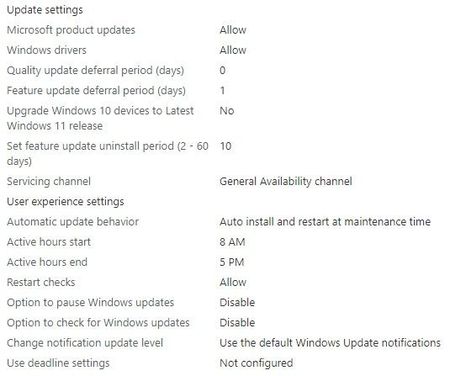


I looked at the 3 registry locations give by Rudy_Ooms_MVP in the first reply. The first 2 are empty and the 3rd appears to have the settings I've applied via the Update Ring.
Mr_Helaas- I think I misunderstood the deadlines - thanks for that review. Friday night I added a 2 day deadline which I also now see in that 3rd registry location. So it appears that the Update Ring policy got updated. The system I'm using for these checks still hasn't updated though that may be just the details of how that deadline gets applied. Maybe I'll know more on that later today.
Another thing I noticed is that when I check the update policies that are applied by going through the Windows Update app, it says that 'Disable automatic updates' is on and managed by Group Policy. However, I've pushed the 'MDMWinsOverGP' configuration and I can see that set in:
HKLM\SOFTWARE\Microsoft\PolicyManager\current\device\ControlPolicyConflict
- Mr_HelaasMay 23, 2022Steel Contributor
Hi DGMalcolm ,
I think you have found your problem. Your gpo is blocking updates. Did you configure any windows update settings in your gpo?
Is it possible to exclude your test device on that gpo? Only to check if the update will be installed.
how did you configure the mdm wins over gpo config?
Please share the results know.
Kind regards,
Rene
- DGMalcolmMay 23, 2022Iron Contributor
Mr_Helaas- There are only 2 GPOs assigned to the system (per gpresult) and neither GPO has any settings related to Windows Update. Prior this effort, these systems were managed by an RMM which used its own settings not a GPO.
The settings I used for the MDM config are shown in the screen shot below. It is applied to all devices.
