Forum Discussion

comgam
Jul 17, 2025Brass Contributor
Microsoft Intune Connector for Active Directory security update
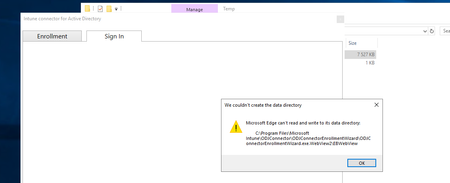
Hi i read this article to update our Intune Connector Microsoft Intune Connector for Active Directory security update | Microsoft Community Hub (version 6.2505.2001.2 downloaded from Intune portal...

Bogdan_Guinea
Jul 17, 2025Steel Contributor
Hy,
The latest builds of the Intune Connector now use Microsoft Edge’s WebView2 for secure browser features during setup, replacing older technologies. This brings new dependency and permission requirements. Updating without adjusting permissions or missing the WebView2 installation often results in this error.
Try these steps:
- Fix Folder Permissions:
- Go to the path shown in the error.
- Right-click the EBWebView folder (or its parent, if it doesn't exist) and select Properties.
- Under the Security tab, ensure the account running the connector has Full control permissions (or at least Modify, Read & Write).
- If needed, add Everyone and grant Full control for testing (remove later for security).
- Apply changes and try again.
- Run as Administrator:
- Right-click the Intune Connector icon and select Run as administrator to see if elevated privileges resolve the issue.
- Reinstall/Repair WebView2 Runtime:
- Download the latest Microsoft Edge WebView2 Runtime and install it.
- Alternatively, in Apps & Features, find Microsoft Edge WebView2 Runtime and use the "Repair" option.
- Uninstall and Reinstall Intune Connector:
- Ensure you have the latest version from the Intune portal.
- Uninstall the connector, then reinstall it following Microsoft’s guidance for your environment.
Good luck!