Forum Discussion

Intune Install Printer Driver
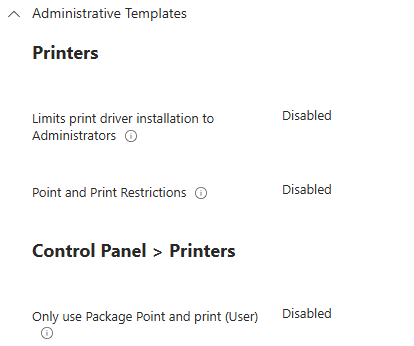

0x80070705 maps to “The printer driver is unknown.” The screenshot also shows that the printer policies are not blocking administrator driver installation, so this is more likely an INF path, driver-name, or packaging issue than a Point and Print restriction.
The main problem with the current script is the relative path:
pnputil.exe /add-driver "r4600.inf" /install
When Intune runs a Win32 app as System, do not assume that the working folder is the same folder used during manual testing. Include the INF and every file supplied with the driver package in the .intunewin package, then use $PSScriptRoot to point to the exact INF file.
$driverName = "PCL6 V4 Driver for Universal Print" $infPath = Join-Path $PSScriptRoot "r4600.inf" & "$env:windir\System32\pnputil.exe" /add-driver $infPath /install if ($LASTEXITCODE -notin 0, 3010) { exit $LASTEXITCODE } Add-PrinterDriver -Name $driverName -InfPath $infPath -ErrorAction Stop
Also confirm that PCL6 V4 Driver for Universal Print is the exact driver name defined by the INF, not only the package or download name. After a successful manual installation, run:
Get-PrinterDriver | Select-Object Name, Manufacturer
Use the exact value shown under Name in the Intune script.
For the Win32 app, use an install command such as:
powershell.exe -ExecutionPolicy Bypass -File .\Install-PrinterDriver.ps1
Run it in the System context and use a detection rule based on the installed printer driver, not merely the presence of the INF file. For example, detect whether Get-PrinterDriver -Name "PCL6 V4 Driver for Universal Print" succeeds.
Finally, check C:\ProgramData\Microsoft\IntuneManagementExtension\Logs\IntuneManagementExtension.log and C:\Windows\INF\setupapi.dev.log. They should show whether Intune cannot find the INF, whether a driver-package dependency is missing, or whether the driver name does not match.