Forum Discussion

Intune Compliance Policy: Device not compliant because of missing machine risk score: deactivated?

 Microsoft
simcpk To check if you have Windows 10 E5 (or A5 for EDU's), or MTP E5, are you able to login to SecurityCenter.Microsoft.com and see your Windows 10 1607 or newer enrolled there?

OS
Windows 10 x64
Version 1903
Build 18362
- Wim BorgersDec 20, 2021Copper Contributor
molislaegers Thanks for the info. When we originally had this issue and created this thread our machines were already HAAD joined, and we had the issue nevertheless. I would need to check on the current status with my colleague, but it is odd that the ticket mentions that as a solution.
 Julian_JerryDec 17, 2021Copper ContributorThank you for the fast reply. Oh, hmm, I completely missed this prerequisite.
Well, it is strange, because everything else is working, so it is not that "totally not supported", just Risk Score is not working, everything else seems to be connected and active. Very missleading.
I will create the same workaround as you.
Thank you once more.- molislaegersDec 17, 2021Brass ContributorThe answer I've got on my service ticket:
A machine has to be AAD / HAAD Joined to detect the risk score. It's in the prerequisites on: https://docs.microsoft.com/en-us/mem/intune/protect/advanced-threat-protection#prerequisites
What I've done is making a second Compliance Policy for registered devices without the Risk Score component. - Julian_JerryDec 17, 2021Copper Contributor
I have exact same issue as you are describing. Were you able to somehow overcome this? I needed to deploy some BYOD devices, Azure AD Joined devices are not an option. ( we already have that for company-owned devices, and it is working just fine )
Devices are properly AD Registered, Intune Managed, onboarded into Microsoft Defender for Endpoint, but in the Endpoint manager admin center, the computer is failing at compliance policy with "Require the device to be at or under the machine risk score: Not Compliant."In the Company portal, I am receiving the same error message "Enroll your device in Microsoft Defender for Endpoint".
In the defender portal, I can see, that the Device is Onboarded properly, Active but at the Exporuse level, there is: "No data available".
It seems like the portal is not able to somehow properly get the data from the device, to calculate exposure level.I have tried re-deploying defender manually with no luck ( currently deploying with policy ). I have re-imaged the testing device and re-enrolled into the system countless times.
Thank you for any hint.
- molislaegersNov 12, 2021Brass Contributor
This issue still exists today..
Device: Setup with personal (offline or Microsoft account)
Added Work or School Account
Intune: Made corporate and assigned policies / apps
Defender for Enpoint: Enrolled
Azure AD shows: AAD Registered
AAD Registered machines don't get compliant in Intune because of their risk Score. The devices are Active in the Microsoft Security Portal (Defender for Endpoint).
The company portal says: "Enroll your device in Microsoft Defender for Endpoint" --> It is!When I test it with eicar.com it detects and show that on the Defender for Endpoint portal.
What else to do..
Joining the device to AAD is not an option at this moment. - Wim BorgersJan 08, 2020Copper Contributor
TeknaDan Thanks for the info. That is good to know. We will check it on our systems as well. That is indeed an elegant solution! Although in the end Microsoft still needs to fix this. 🙂
 TeknaDanJan 08, 2020Copper Contributor
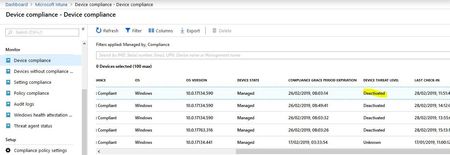
Wim Borgers I might have found a way to fix this issue without getting Microsoft involved. I had the same issue with new machines showing Non-Compliant and Deactivated in InTune but found that shortly after running the detection test against a machine (found in Microsoft Defender Security Center --> Settings --> Machine Management --> Onboarding) it checked into ATP and was then marked Compliant. Tested this with 3 machines so far and it worked for all of them.
- Wim BorgersDec 10, 2019Copper Contributor
simcpk Thanks for the info! Glad the issue got solved for you. I think the info will be useful for others in this thread as well. I will relay this info to our sysadmin and we will check our own tenant as well. 🙂
- simcpkDec 10, 2019Brass Contributor
Wim Borgers Well, I'm fixed. They ran some sort of back-end sync and and all of my machines are reporting properly. I asked whether or not this fix was applied only to my tenant or whether it was a platform-wide change and I received the following response --
"Actually I was checking from the backend team whether the fix was only for specific to your tenant or there were other tenants on which this fix was deployed .
I got a confirmation that they have deployed a fix for the ATP service to get it working again over the weekend 12/7-8 and it was only for your tenant ."
So anyone else that is having this issue has two options:
- Start a support case to beg and plead that they run whatever back-end sync it is that fixes this. Keep in mind this took 2(!) months for me as the passed me back and forth between Intune and ATP support and ruled out all of the things that I may have mucked up.
- Run the WD ATP detection test script on all affected machines.
In fact, I would probably run the detection test script on a machine or two first to make sure that it resolved the problem and that you didn't have an entirely different issue at play. After verifying that this resolves it, you might pursue the support case for a back-end sync.
- Wim BorgersDec 06, 2019Copper Contributor
simcpk Thanks for the update. That is useful info. Those who are experience the issue can now at least fix it.
I did mention this issue to Microsoft at the Defender ATP or Intune (forgot which) booth at Microsoft Ignite 2019. They told me that there were some synchronisation issues between Intune and Defender ATP and that they worked hard with both teams to resolve the sync issues. I was told some new code was released just before Ignite that should fix most issues. He did not reference or confirm this specific issue though.
Another Belgian consultant had the same issue, by the way. So we are certainly not the only ones who are battling with this.
The strange thing is that your test was after Ignite, so it is still unclear if it is fixed or not....
- simcpkDec 02, 2019Brass Contributor
A quick update --
After a few false starts and transfers to different teams, we've learned a few things. Firstly, my configuration is correct. I'm being assured that Microsoft is looking at this issue internally and will provide guidance -- the case will remain open until then. We have a workaround that we can apply which simply involves running a test detection for Defender ATP (https://docs.microsoft.com/en-us/windows/security/threat-protection/microsoft-defender-atp/run-detection-test) for any of the machines experiencing this issue. Within about 15 minutes of running this, they shift to a compliant state. I've never had a machine return to the non-compliant, deactivated state after running this test so it seems the workaround is permanent.
I'm hoping there is something that Microsoft can do that would obviate the need to run this test detection on every affected machine and I'll try to report back when the case is closed.
 RyanReynoldsOct 24, 2019Copper Contributor
simcpk I dont want to try that but I am having issues onboarding Windows 10 1903 devices to the Microsoft Security Defender Center. I have tried local script, GPO and Intune to try to join the devices and I have had not luck. I tried an 1809 device and it showed up in the Defense Center within 5 minutes. It seems like there are some issues with ATP. All my devices show as Successful for the Microsoft Defender ATP configuration profile- none of the 1903 devices I have tried to add in the last week have made it.
- simcpkOct 24, 2019Brass Contributor
Even though the ATP <--> Intune connector claims to be healthy and working fine, I had a thought to try to recreate it and have gotten some troubling results. When I toggled off the Connect Windows devices version 10.0.15063 and above to Microsoft Defender ATP option in the Intune settings and I received an error stating "An error occurred. Couldn't establish the connector. Try again later." I receive this error whether I'm toggling it On or Off. Toggling on and off the connector from the Defender ATP portal gives me no errors.
Is anyone else willing to see if they get a similar error when toggling in the Intune portal?
- simcpkOct 17, 2019Brass Contributor
Wim Borgers Thanks for checking back in. I've been working with support and the Intune team verified that everything is configured correctly on our end. We, too, are dealing with hybrid Azure AD joined devices that have tons of inexplicable, transient issues regarding device compliance. As of yesterday evening, the Intune team agreed to reach out to the Windows Defender ATP team to figure out why the services aren't talking to each other successfully. The WD ATP dashboard shows all of these devices as healthy, but still our devices are marked Deactivated under Device Threat Level in Intune. I'll report back with any useful findings. Until this works, the whole Zero Trust model of secure network design will remain out of reach for us which is a shame.
- Wim BorgersOct 17, 2019Copper Contributor
I am the OP of this thread. Just checked the compliance state again and for us it seems the issue is transient. All our machines are Hybrid Azure AD joined.
We do still see machines being reported as 'not compliant'. Some of them have no compliance issue if you look at the policies in detail on the device level, but in the overview list they are still 'not compliant'.
Other are not compliant because one of the policies is not compliant for the system users. Still very confusing. It messes up all the reports and we cannot work with the compliance level at all in policies. 😞
- yongrheemsftOct 16, 2019
Hi Philip, I was able to reproduce the issue. I edited my first reply on this e-mail thread w/ details on how to make it work. At least in my lab. Give it a try, and hopefully that will help you in your environment too.
