Forum Discussion

Intune Compliance Policy: Device not compliant because of missing machine risk score: deactivated?

RyanReynoldsThanks for the feedback. That is indeed not a comfortable situation to be in. I just checked our device list and they are still marked as compliant, with the exception of one device for another reason.
In any case, the behaviour seems flaky to it would be great if this could be addressed by the Intune team.

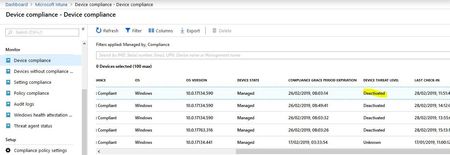
I am having the same issue, I have tested this on 6 Win10 computers at this point, it seems that if I Azure AD Domain Join the computers everything works fine, if I Azure AD Register and MDM Manage the device, it will show up as clear or level 1 in WATP poral and as Deactivated in Intune portal.
I've read conflicting information in the documentation, is Azure AD Domain Join mandatory? Seems ridiculous if it is, I mean the Mac client was releases and how are you supposed to deal with BYOD if this is the case? I am working a support case with Microsoft and they are adamant about the fact that MDM Managed devices should report correctly but we have been working the case for 15 days so far and no changes. The strange thing is I can configure ASR, cloud protection, and set any of the other policies with no trouble. This makes it seem it may just not currently work unless the system is Domain Joined and MDM Managed and not Domain Registered and MDM Managed.
If anyone has any details at all, would love to hear them. We have several deals closed with clients to deploy M365 E5 and I want to prepare them if Intune isn't going to show their security status in Intune as this is going to effectively kill our ability to use Conditional Access to limit access based on risk.
Thanks!
- Wim BorgersJun 14, 2019Copper ContributorThanks for the adding your experiences to this thread. Short update on our experience: in the end all our device will be set to compliant, but it can take days. That poses a problem when you want to activate conditional access based on compliancy.
When looking at the device status of the compliance policy most devices are shown twice. Once with the user 'system account' and once with the regular user of the machine. In the end it does not seem to affect the compliance status of the device itself but it is annoying and makes it very hard to find that one device that is in fact not compliant.- Jerod PowellJun 14, 2019Brass Contributor
Mine never went compliant, no idea what the heck, everything else works but not that and I can't get support from Defender ATP team to save my life even with a support contract. Intune guys took me through a million steps and were great but even they say it is a DATP issue so I am just sort of stuck. Overally clearly some major issues with the integration still. Wim Borgers
- MyronHelgeringOct 03, 2019Brass Contributor
Jerod PowellWe are having the same issue with one of our customers, I have had 4 different Intune teams trying to solve it but it looks to be a bug in Defender ATP portal not showing up a threat for the device which causes this issue.
