Forum Discussion

Intune 403 error when trying to access InTune portal
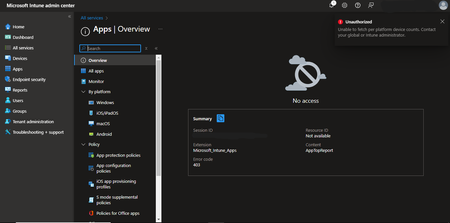

Hi paltabhuvesh1 I would try these steps:
1-Check Conditional Access Policies
Conditional Access policies might block access to Intune for certain users or devices. This can happen if:
There are policies that restrict access based on device compliance, location, or MFA status.
The user or device doesn’t meet the policy requirements, such as being on an unmanaged device or failing MFA.
Check if any conditional access policies are in place by navigating to Azure AD > Security > Conditional Access. Verify that the policies aren’t unintentionally blocking access
2-Clear Browser Cache or Try a Different Browser
Sometimes, caching or cookies can cause issues with authentication.
Try clearing your browser’s cache and cookies or attempt to log in using a different browser (e.g., if you're using Chrome, try Edge or Firefox).
You can also try using a private/incognito mode to see if that resolves the issue.
3-Global Service Outage
Check the Microsoft 365 Service Health page or Azure Status Page for any service outages or issues affecting the Intune service. Microsoft sometimes experiences global outages that might affect access to various services, including Intune.
4-Re-Assign Licenses or Roles
In some cases, removing the user’s licenses or roles and then reassigning them can resolve access issues.
Try unassigning the Intune or EMS license, waiting for a few minutes, and then reassigning it.
Similarly, you can remove and reassign the Intune Administrator role if permissions are in question.

Thanks for help micheleariis but I have already tried these steps. Could this error be related to the enterprise application??