Forum Discussion

kbrox
Apr 30, 2021Copper Contributor
How to remove UPN from Intune Devices
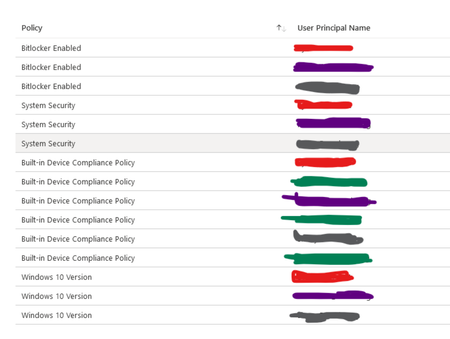
I have Intune devices that have more than one UPN listed. Here's an example where each colour is a different user: The Primary user was set on the Properties setting months ago for this devic...

kbrox
Apr 30, 2021Copper Contributor
Our compliance policies were originally set up to evaluate based on the user's profile on the devices. Therefore if the user's profile wasn't removed from the system after the device was re-assigned to new user, both users would be evaluated for compliance. This increased our numbers of non-compliant devices if more than one user listed on the machine was non-compliant. For example Device #1 had user 1 & 2 who were not compliant, then it would count twice on compliance status. After a call with Microsoft support who pointed this out, the compliance policies were recreated to evaluate by device thereby reducing the non-compliant status numbers.

Apr 30, 2021
Hi,
Thats one of the default (built in) compliance policies. If the primary owner is not logged in for an amount of days, it's not compliant anymore. If the primary user is disabled/deleted the device would be non compliant.
I guess just like you did I grouped all compliance policies into categories for some easier troubleshooting