Forum Discussion

Drive Encryption through Endpoint Security no longer showing option to backup information in Entra

Hi sdahiya4,
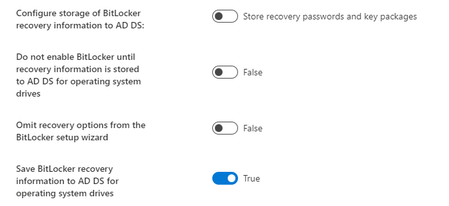
1- Set Store recovery information in Azure Active Directory before enabling BitLocker to True.
This will prevent users from enabling BitLocker unless the computer successfully backs up the BitLocker recovery information to Entra ID. Selecting Require will ensure that the recovery keys are successfully stored in Entra ID before encryption is enabled.
2- Set Save BitLocker recovery information to Azure Active Directory to True.
3- Enable the BitLocker recovery information to be stored in Entra ID on the device object, so
end users can retrieve it themselves on devices where they are the primary users. The Entra
ID admin with the right privileges can always retrieve the BitLocker recovery key.
feel free to reach out anytime. I'm here to help!