Forum Discussion

Compliance Policies - Device Health Attestation failing (Syncml 404 / 0x87d10194)
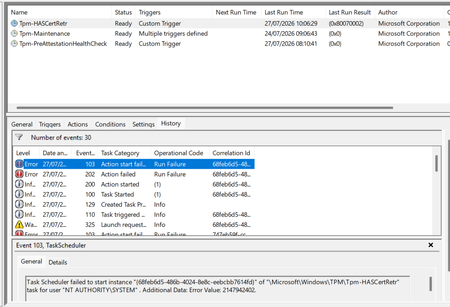

Your evidence shows BitLocker, Secure Boot, and Code Integrity are enabled, but Intune cannot retrieve a health-attestation certificate. The three compliance errors therefore appear to stem from one attestation failure, not separate configuration faults. Microsoft’s documentation does not identify Nuvoton TPM Root CA 2111 as a known issue or provide a client-side chain repair. Open Reports > Device Compliance > Windows hardware attestation report and record the error, correlation ID, and certificate date. Confirm the device can reach Microsoft Azure Attestation endpoints over HTTPS 443 without TLS inspection, then restart and sync once. Export management logs from Settings > Accounts > Access work or school and collect the DeviceManagement-Enterprise-Diagnostic-Provider Admin log. Do not clear the TPM before protecting recovery keys and data. If identical hardware still fails, open an Intune support case with the EK chain, logs, tenant region, and affected models so Microsoft can validate its service trust.

Hi there,
Thanks for your well thought out and detailed reply, weirdly enough YESTERDAY, a preview update came out that has actually resolved this: https://support.microsoft.com/en-us/servicing/os/windows-11/2026/07/july-28-2026-kb5101684-preview
Thanks again