Forum Discussion

Khachik
Apr 20, 2022Copper Contributor
Comanaged device hybird join WUFB issue
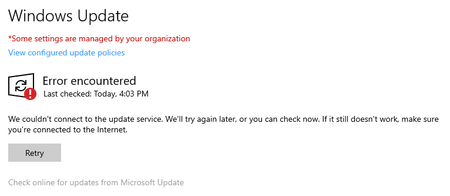
Hi All, Need some assistance with WUFB comanaged in a hybird environment. Issue: 1. Windows update error encountered -I resolved this by modifying reg key in Computer\HKEY_LOCAL_MACHINE\SOFTWAR...

Apr 21, 2022
Hi,
Its a little bit hard to detect the error when looking at the pictures.. but what happens when pushing down this powershell sc ript to the problem device
function Clear-WsusSettings {
[cmdletbinding(SupportsShouldProcess=$true)]
param ()
$ErrorActionPreference = 'SilentlyContinue'
Remove-ItemProperty 'HKLM:\Software\Policies\Microsoft\Windows\WindowsUpdate' -Force -Name WUServer
Remove-ItemProperty 'HKLM:\Software\Policies\Microsoft\Windows\WindowsUpdate' -Force -Name TargetGroup
Remove-ItemProperty 'HKLM:\Software\Policies\Microsoft\Windows\WindowsUpdate' -Force -Name WUStatusServer
Remove-ItemProperty 'HKLM:\Software\Policies\Microsoft\Windows\WindowsUpdate' -Force -Name TargetGroupEnable
Set-ItemProperty 'HKLM:\Software\Policies\Microsoft\Windows\WindowsUpdate\AU' -Value 0 -Force -Name UseWUServer
Set-ItemProperty 'HKLM:\Software\Policies\Microsoft\Windows\WindowsUpdate\AU' -Value 0 -Force -Name NoAutoUpdate
Set-ItemProperty 'HKLM:\Software\Policies\Microsoft\Windows\WindowsUpdate' -Value 0 -force -Name DisableWindowsUpdateAccess
Restart-Service -Name wuauserv
}
Clear-WsusSettings
Its a little bit hard to detect the error when looking at the pictures.. but what happens when pushing down this powershell sc ript to the problem device
function Clear-WsusSettings {
[cmdletbinding(SupportsShouldProcess=$true)]
param ()
$ErrorActionPreference = 'SilentlyContinue'
Remove-ItemProperty 'HKLM:\Software\Policies\Microsoft\Windows\WindowsUpdate' -Force -Name WUServer
Remove-ItemProperty 'HKLM:\Software\Policies\Microsoft\Windows\WindowsUpdate' -Force -Name TargetGroup
Remove-ItemProperty 'HKLM:\Software\Policies\Microsoft\Windows\WindowsUpdate' -Force -Name WUStatusServer
Remove-ItemProperty 'HKLM:\Software\Policies\Microsoft\Windows\WindowsUpdate' -Force -Name TargetGroupEnable
Set-ItemProperty 'HKLM:\Software\Policies\Microsoft\Windows\WindowsUpdate\AU' -Value 0 -Force -Name UseWUServer
Set-ItemProperty 'HKLM:\Software\Policies\Microsoft\Windows\WindowsUpdate\AU' -Value 0 -Force -Name NoAutoUpdate
Set-ItemProperty 'HKLM:\Software\Policies\Microsoft\Windows\WindowsUpdate' -Value 0 -force -Name DisableWindowsUpdateAccess
Restart-Service -Name wuauserv
}
Clear-WsusSettings
 KhachikApr 21, 2022Copper Contributor
Hi Rudy,
Thank you for your response.
I ran the script and confirmed the entries was either removed and added.
However, Windows update still states "You're up to date" but its still on windows 21h1.
Thank you,
-K