Forum Discussion

AppLocker profile doesn't work
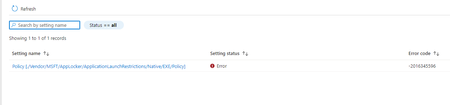

I just found something. The Remediation status show Not run.
Below is the Remediation script I uploaded:
# Start-Process Installers and Arguments
$Installer = "$env:ProgramFiles\Google\Chrome\Application\$ChromeVersion\Installer\chrmstp.exe"
$InstallerX86 = "${env:ProgramFiles(x86)}\Google\Chrome\Application\$ChromeVersion\Installer\chrmstp.exe"
$Arguements = "--uninstall --chrome --system-level --multi-install --force-uninstall"
$chromeInstalled = (Get-Item (Get-ItemProperty 'HKLM:\SOFTWARE\Microsoft\Windows\CurrentVersion\App Paths\chrome.exe' -ErrorAction SilentlyContinue).'(Default)').VersionInfo
$ChromeVersion = $chromeInstalled.ProductVersion
# Check for x64 Chrome
$Chromex64 = "C:\Program Files\Google\Chrome\Application\$ChromeVersion\Installer\chrmstp.exe"
$FileExistsx64 = Test-Path $Chromex64
# Check for x86 Chrome
$Chromex86 = "C:\Program Files (x86)\Google\Chrome\Application\$ChromeVersion\Installer\chrmstp.exe"
$FileExistsx86 = Test-Path $Chromex86
# Remove x64 Chrome
If ($FileExistsx64 -eq $True) {
Start-Process $Installer $Arguements -Wait
}
# Remove x86 Chrome
If ($FileExistsx86 -eq $True) {
Start-Process $InstallerX86 $Arguements -Wait
}
Below is the setting.
Do you have any clue of why the remediation not run?

- Sk-73Apr 14, 2022Iron Contributor
Hi, Rudy_Ooms_MVP Below attached is the current status, it seems like the detection script working, but the remediation script is still not running.