Forum Discussion

AppLocker profile doesn't work
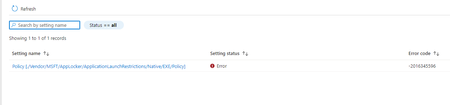

I would recommend starting using the "string (XML file)" As I have seen it happen a lot when using string
When selecting the XML you will get an error when it is not properly formatted, besides this...
I would change the last part.. (or you forgot to copy some stuff 🙂 )
</Conditions>
</FilePublisherCondition>
</RuleCollection>
As shown below.. you could check it out yourself by editing the XML
- Sk-73Apr 13, 2022Iron Contributor
HiRudy_Ooms_MVP Thank you. I just deleted the old configuration profile and create a new one but still failed.
<RuleCollection Type="Exe" EnforcementMode="Enabled"><FilePathRule Id="921cc481-6e17-4653-8f75-050b80acca20" Name="(Default Rule) All files located in the Program Files folder" Description="Allows members of the Everyone group to run applications that are located in the Program Files folder." UserOrGroupSid="S-1-1-0" Action="Allow"><Conditions><FilePathCondition Path="%PROGRAMFILES%\*" /></Conditions></FilePathRule><FilePathRule Id="a61c8b2c-a319-4cd0-9690-d2177cad7b51" Name="(Default Rule) All files located in the Windows folder" Description="Allows members of the Everyone group to run applications that are located in the Windows folder." UserOrGroupSid="S-1-1-0" Action="Allow"><Conditions><FilePathCondition Path="%WINDIR%\*" /></Conditions></FilePathRule><FilePathRule Id="fd686d83-a829-4351-8ff4-27c7de5755d2" Name="(Default Rule) All files" Description="Allows members of the local Administrators group to run all applications." UserOrGroupSid="S-1-5-32-544" Action="Allow"><Conditions><FilePathCondition Path="*" /></Conditions></FilePathRule><FilePublisherRule Id="13bd601b-0f03-4ac1-bd80-ebaf375db674" Name="CHROME.EXE, in GOOGLE CHROME, from O=GOOGLE LLC, L=MOUNTAIN VIEW, S=CALIFORNIA, C=US" Description="" UserOrGroupSid="S-1-1-0" Action="Deny"><Conditions><FilePublisherCondition PublisherName="O=GOOGLE LLC, L=MOUNTAIN VIEW, S=CALIFORNIA, C=US" ProductName="GOOGLE CHROME" BinaryName="CHROME.EXE"><BinaryVersionRange LowSection="*" HighSection="*" /></FilePublisherCondition></Conditions></FilePublisherRule></RuleCollection>I just found and follow the https://sccmentor.com/2021/01/11/using-proactive-remediations-to-remove-google-chrome/comment-page-1/ create a new configuration profile (PROACTIVE REMEDIATIONS) as u mentioned.Waiting for the outcome.
- Apr 13, 2022What happens without that chrome part? just start with a basic export from applocker and import it into Intune to see what happens.
It only occurring on 1 device or multiple?- Sk-73Apr 13, 2022Iron Contributor
I just found something. The Remediation status show Not run.
Below is the Remediation script I uploaded:
# Start-Process Installers and Arguments
$Installer = "$env:ProgramFiles\Google\Chrome\Application\$ChromeVersion\Installer\chrmstp.exe"
$InstallerX86 = "${env:ProgramFiles(x86)}\Google\Chrome\Application\$ChromeVersion\Installer\chrmstp.exe"
$Arguements = "--uninstall --chrome --system-level --multi-install --force-uninstall"$chromeInstalled = (Get-Item (Get-ItemProperty 'HKLM:\SOFTWARE\Microsoft\Windows\CurrentVersion\App Paths\chrome.exe' -ErrorAction SilentlyContinue).'(Default)').VersionInfo
$ChromeVersion = $chromeInstalled.ProductVersion# Check for x64 Chrome
$Chromex64 = "C:\Program Files\Google\Chrome\Application\$ChromeVersion\Installer\chrmstp.exe"
$FileExistsx64 = Test-Path $Chromex64# Check for x86 Chrome
$Chromex86 = "C:\Program Files (x86)\Google\Chrome\Application\$ChromeVersion\Installer\chrmstp.exe"
$FileExistsx86 = Test-Path $Chromex86# Remove x64 Chrome
If ($FileExistsx64 -eq $True) {
Start-Process $Installer $Arguements -Wait
}
# Remove x86 Chrome
If ($FileExistsx86 -eq $True) {
Start-Process $InstallerX86 $Arguements -Wait
}Below is the setting.
Do you have any clue of why the remediation not run?
