Forum Discussion

skylarh
Oct 10, 2023Copper Contributor
Disable Office 365 Products ability to download (MOBILE)
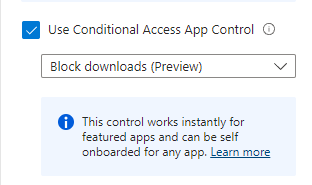
Hello, I am trying to disable the ability for people to download files from the Teams / Outlook applications on their mobile devices. I selected the Disable Downloads feature from a Condition...

Oct 10, 2023
your user is licensed with the P1 License ?

skylarh
Oct 10, 2023Copper Contributor
Our tenant has an E5 license assigned with an Entra ID P2 assigned.
I have gone ahead and assigned myself an Azure Information Protection Premium P1 license to see if that will change it.
I have gone ahead and assigned myself an Azure Information Protection Premium P1 license to see if that will change it.
- skylarhOct 11, 2023Copper ContributorThanks for this, I'll take a further look at it.
- Oct 10, 2023even if the devices are not managed you can control the outlook application by targeting the users
https://github.com/MicrosoftDocs/memdocs/blob/main/memdocs/intune/protect/tutorial-protect-email-on-unmanaged-devices.md - skylarhOct 10, 2023Copper Contributor
elieelkarkafi I can't really find what I am looking for in Intune. Would you know the policy for it? All of these devices are not managed.
- Oct 10, 2023MDCA session controls are built to work with any browser only such as chrome and edge through the reverse proxy. if you want to manage the apps on mobile devices you can use the app protection policy in Intune with allows you to bloc downloads
https://learn.microsoft.com/en-us/mem/intune/apps/app-protection-policy - skylarhOct 10, 2023Copper ContributorSo it worked on a browser-based version, however, the apps do not work. We would need to find a way for it to cascade down to the applications.
- Oct 10, 2023the E5 inlcudes all the license required for your setup , please try with the same user using an Edge browser in your machine and see if it block you