Forum Discussion

eahbxecrfash3q
Jul 29, 2025Brass Contributor
Support Needed: Streamlining ID Comparison Process
Hi everyone, About once a month, the Workday (WD) team posts updates to the cost center hierarchy, which are documented in the WD Report spreadsheet. This spreadsheet contains two tables on differen...

Kidd_Ip
Jul 29, 2025MVP
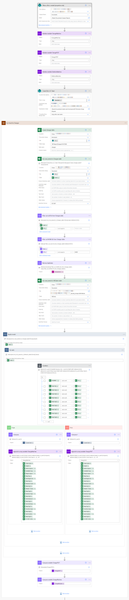
May consider Power Automate:
1. Trigger: Manual or scheduled (e.g. monthly)
2. Get Rows:
-
- Use Excel Online (Business) connector to get rows from:
- AllClaims table in Master List
- Changes and Deletions tables in WD Report
- Use Excel Online (Business) connector to get rows from:
3. Extract IDs:
-
-
-
- For each row in AllClaims, use an expression to split the "Group Name" value:
-
-
split(items('Apply_to_each')?['Group Name'],' ')[0]This grabs the ID portion before the space.
4. Compare IDs:
-
- Use nested Apply to Each loops or filter arrays to check if the extracted ID exists in either Changes or Deletions.
- You can use a Union of both tables to simplify:
union(ChangesIDs, DeletionsIDs)
5. Store Matches:
-
- Append matching rows to a new array or write them to a new Excel sheet/table for reporting.