Forum Discussion

Copying Links to Paragraphs in OneNote
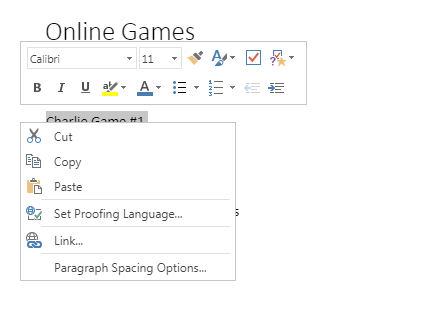

Copy and paste a link to a paragraph
Move your cursor to the left edge of the paragraph you want to link.
Right-click the four-headed arrow next to the paragraph the link should point to.
On the shortcut menu, click Copy Link to Paragraph.
The link to the selected paragraph and the paragraph text are copied to the Clipboard.
Click the location on the page that is to contain the link.
Right-click the location on the page that is to contain the link, and on the shortcut menu, choose Paste.
OneNote inserts a link that, when clicked, displays the target paragraph.

I'm also trying to create a hyperlink in OneNote. I have tried doing so on the OneNote app and OneNote online. In both instances there is no "Copy link to paragraph" option available in the shortcut menu(the same as the post above). How is this possible? And which other method can I try besides right-clicking the four headed arrow or right-clicking the highlighted text?