Forum Discussion

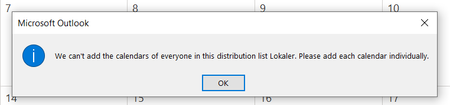
Can't add group of calendars in Outlook
 Dec 06, 2021
RuneGL I had the same issue. Try turning off shared calendar improvements.
Go to account settings in Outlook. Then the Exchange account settings. Go to More Settings. Then Advanced. Uncheck "Turn on shared calendar improvements" under Microsoft 365 features.
Hope this helps

On the desktop version of outlook this functions as expected:
you select the distribution list from the address book and every single person is added individually.
But once you do the same thing on the web, it just adds a single calendar with the address of the distribution list, which is not at all what i want.
- RobinKeijenbergSep 25, 2024Copper Contributor
i have the same problem/question.
At the reception, we have a AD-user logged in with no M365 license, but we want to see all calendars of the colleagues in that particular building. The user who is in charge of reception that day logs in to the online Outlook web app with his/her account on the pc (with only an AD-user account).
No calenders from de distibution group members are visible, or no posibility to add them.
in outlook desktop app on the laptop of the person, we can see all the calenders.