Forum Discussion

MarkusOE
Apr 22, 2024Brass Contributor
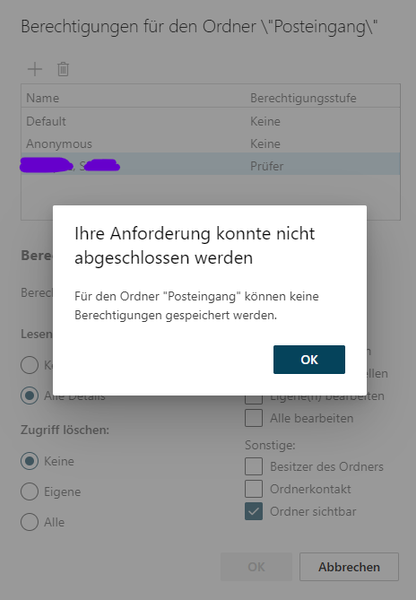
Adding MailboxFolderPermission to certain user fails with Powershell as well as OWA
Hallo! I try to add a MailboxFolderPermission for the assistant to the inbox of the manager. That fails with Powershell as well as Outlook on the web. If instead I grant a MailboxFolderPermission...
 Apr 24, 2024Solved.
I'm sorry for not being able to mention everything and everybody that contributed to finding the solution. It helped a lot to find many articles mentioning the relation of this problem to converting between shared and user mailbox as well as changes in name, upn, etc. Both was the case here. As far as I remember i was the following article that led my directly to the cause as well as the solution:
https://answers.microsoft.com/en-us/msoffice/forum/all/the-attribute-accountdisabled-changing-for-true/40b3ed9a-3351-4272-9b91-d447db126c1f
THIS IS HOW I FOUND THE MAILBOX IN EXCHANGE ONLINE WHEN THE ISSUE OCCURED
get-mailbox xyz | select ExchangeUserAccountControl,AccountDisabled,RecipientType,RecipientTypeDetails
ExchangeUserAccountControl : AccountDisabled, NormalAccount
AccountDisabled : True
RecipientType: User : Mailbox
RecipientTypeDetails : UserMailbox
WHEN I TRIED TO ENABLE THE MAILBOX IT TOLD ME IT WAS A SHARED MAILBOX ALTHOUGH IT SHOWED UP AS A USER MAILBOX IN EXCHANGE ONLINE ADMIN CENTER AS WELL AS IN POWERSHELL
set-mailbox xyz -AccountDisabled $false
WARNUNG: Das freigegebene Postfach "email address removed for privacy reasons" kann nicht aktiviert werden.
From now on I assumed that the cause was a party failed re-conversion from a shared to a user mailbox in the past. Although the user account was enabled in Entra, it was disabled in Exchange. Therefore there was no (active) Exchange security principal that permissions could have been assigned to.
SOLUTION
a) RemoteMailbox (Exchange Management Shell)
Get-RemoteMailbox xyz | Set-RemoteMailbox -Type shared
Invoke-Command -ComputerName servername -ScriptBlock {start-adsyncsynccycle -policytype delta}
Get-RemoteMailbox xyz | Set-RemoteMailbox -Type regular
Invoke-Command -ComputerName servername -ScriptBlock {start-adsyncsynccycle -policytype delta}
b) Mailbox (Exchange Online Powershell)
get-mailbox xyz | Set-Mailbox -Type shared
set-mailbox SchoSa1 -Type regular
I could see in the Entra logs that all of my above changes were taking effect on the user object related to the mailbox.
Now I was able to assign MailboxFolderPermissions to the security principal of the mailbox.
MarkusOE
Apr 24, 2024Brass Contributor
Solved.
I'm sorry for not being able to mention everything and everybody that contributed to finding the solution. It helped a lot to find many articles mentioning the relation of this problem to converting between shared and user mailbox as well as changes in name, upn, etc. Both was the case here. As far as I remember i was the following article that led my directly to the cause as well as the solution:
https://answers.microsoft.com/en-us/msoffice/forum/all/the-attribute-accountdisabled-changing-for-true/40b3ed9a-3351-4272-9b91-d447db126c1f
THIS IS HOW I FOUND THE MAILBOX IN EXCHANGE ONLINE WHEN THE ISSUE OCCURED
get-mailbox xyz | select ExchangeUserAccountControl,AccountDisabled,RecipientType,RecipientTypeDetails
ExchangeUserAccountControl : AccountDisabled, NormalAccount
AccountDisabled : True
RecipientType: User : Mailbox
RecipientTypeDetails : UserMailbox
WHEN I TRIED TO ENABLE THE MAILBOX IT TOLD ME IT WAS A SHARED MAILBOX ALTHOUGH IT SHOWED UP AS A USER MAILBOX IN EXCHANGE ONLINE ADMIN CENTER AS WELL AS IN POWERSHELL
set-mailbox xyz -AccountDisabled $false
WARNUNG: Das freigegebene Postfach "email address removed for privacy reasons" kann nicht aktiviert werden.
From now on I assumed that the cause was a party failed re-conversion from a shared to a user mailbox in the past. Although the user account was enabled in Entra, it was disabled in Exchange. Therefore there was no (active) Exchange security principal that permissions could have been assigned to.
SOLUTION
a) RemoteMailbox (Exchange Management Shell)
Get-RemoteMailbox xyz | Set-RemoteMailbox -Type shared
Invoke-Command -ComputerName servername -ScriptBlock {start-adsyncsynccycle -policytype delta}
Get-RemoteMailbox xyz | Set-RemoteMailbox -Type regular
Invoke-Command -ComputerName servername -ScriptBlock {start-adsyncsynccycle -policytype delta}
b) Mailbox (Exchange Online Powershell)
get-mailbox xyz | Set-Mailbox -Type shared
set-mailbox SchoSa1 -Type regular
I could see in the Entra logs that all of my above changes were taking effect on the user object related to the mailbox.
Now I was able to assign MailboxFolderPermissions to the security principal of the mailbox.
I'm sorry for not being able to mention everything and everybody that contributed to finding the solution. It helped a lot to find many articles mentioning the relation of this problem to converting between shared and user mailbox as well as changes in name, upn, etc. Both was the case here. As far as I remember i was the following article that led my directly to the cause as well as the solution:
https://answers.microsoft.com/en-us/msoffice/forum/all/the-attribute-accountdisabled-changing-for-true/40b3ed9a-3351-4272-9b91-d447db126c1f
THIS IS HOW I FOUND THE MAILBOX IN EXCHANGE ONLINE WHEN THE ISSUE OCCURED
get-mailbox xyz | select ExchangeUserAccountControl,AccountDisabled,RecipientType,RecipientTypeDetails
ExchangeUserAccountControl : AccountDisabled, NormalAccount
AccountDisabled : True
RecipientType: User : Mailbox
RecipientTypeDetails : UserMailbox
WHEN I TRIED TO ENABLE THE MAILBOX IT TOLD ME IT WAS A SHARED MAILBOX ALTHOUGH IT SHOWED UP AS A USER MAILBOX IN EXCHANGE ONLINE ADMIN CENTER AS WELL AS IN POWERSHELL
set-mailbox xyz -AccountDisabled $false
WARNUNG: Das freigegebene Postfach "email address removed for privacy reasons" kann nicht aktiviert werden.
From now on I assumed that the cause was a party failed re-conversion from a shared to a user mailbox in the past. Although the user account was enabled in Entra, it was disabled in Exchange. Therefore there was no (active) Exchange security principal that permissions could have been assigned to.
SOLUTION
a) RemoteMailbox (Exchange Management Shell)
Get-RemoteMailbox xyz | Set-RemoteMailbox -Type shared
Invoke-Command -ComputerName servername -ScriptBlock {start-adsyncsynccycle -policytype delta}
Get-RemoteMailbox xyz | Set-RemoteMailbox -Type regular
Invoke-Command -ComputerName servername -ScriptBlock {start-adsyncsynccycle -policytype delta}
b) Mailbox (Exchange Online Powershell)
get-mailbox xyz | Set-Mailbox -Type shared
set-mailbox SchoSa1 -Type regular
I could see in the Entra logs that all of my above changes were taking effect on the user object related to the mailbox.
Now I was able to assign MailboxFolderPermissions to the security principal of the mailbox.