Forum Discussion

RequireSenderAuthenticationEnabled - Distribution Groups - Exchange 2016
- Jul 12, 2023
- Can I use eDiscovery (on Exchange 2016 or something else) to check all recieveng messages or logs for a longer period?
If admin audit logging is enabled, yes. But since it was not at that time, you can't since it will only log future events.
- What was the default vaule on Exchange Server 2010 regarding "Require that all senders are authenticated")?
IIRC, default is unspecified, which corresponds to $true. Has been like that since Ex2007, same is true for Exchange Online.
- Is it possible that for some reason those settings automatically changed? Or is it more possible that the default settings for external emails was not changed when the distribution groups were created?
No, there is no policy for that. It requires configuration, either by hand, by some process. Your EXO setting is managed (synced) by AD Connect (msExchRequireAuthToSendTo).
- I tried checking event logs, tried with Powershell (Get-DistributionGroup | Where{$_.WhenChanged -gt ((Get-Date).AddMonths(-24))} and Audit log. I can´t find anything regarding changes in the mentiond setting on Exchange 2010 or Exchange 2016.
This happens always when you turn audit logging only on when it was needed before.
Now your savior might be AD Connect; if it was synced from on-premises after it was changed, AD Connect might provide details on the data it has on the object, or you can look through its logs. Cmdlets like the following might help you parse and filter instead of going through the UI 🙂
Export-ADsyncObject -DistinguishedName 'CN=GroupX,OU=Groups,DC=Contoso,DC=com' -ConnectorName 'ad.contoso.com'


Hi LeonPavesic
is the adminauditlog enabled in your server if it enabled it might help you.
I think that this task would achieved if you were using third party solution
If I have answered your question, please mark your post as Solved If you like my response, please give it a Like Appreciate your Kudos! Proud to contribute! 🙂 |


Hi Deleted and kevkelly,
thanks for your answers.
Our distribution groups are visible on Exchange Server 2010 and Exchange Server 2016 and they are synced with Exchange Online (they are visible in Exchange Admine Centre but not managable). They are managable in Exchange 2016 (Exchange Admin Centre) and Exchange 2010 (in Exchange Management Console). They were created 2017, the Exchange 2016 was installed on 2021 and they are both still in use.
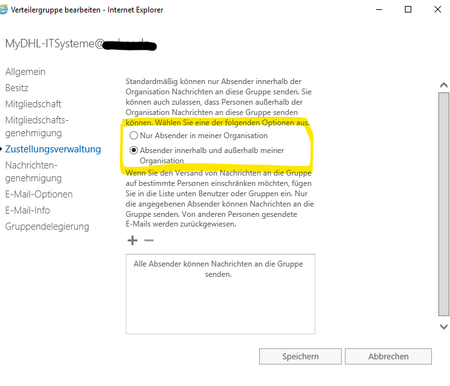
I changed the settings on Exchange 2016 (RequireSenderAuthenticationEnabled = False) so that this Distribution Group can recieve external emails. But, the email delivery failed.
Then, I have checked the same distribution group on Exchange 2010 and the setting "Require that all senders are authenticated" in Message Delivery Restrictions was checked (turned on), Then i unchecked this option (turned it off), sent an external email and it worked.
Exchange 2016
Exchange 2010 - the same distribution Group
So if I got it right, all the settings on Exchange 2010 have priviledge comparing to Exchange 2016, is that right?
The people working in company longer then me are claiming that the external email recieveing settings were set up correctly, so that distribution group can recieve external emails (but I can't see any external email in message trace for the last 90 days - that means last 90 days those settings were not enabled for external emails).
- Can I use eDiscovery (on Exchange 2016 or something else) to check all recieveng messages or logs for a longer period?
- What was the default vaule on Exchange Server 2010 regarding "Require that all senders are authenticated")?
- Is it possible that for some reason those settings automatically changed? Or is it more possible that the default settings for external emails was not changed when the distribution groups were created?
- I tried checking event logs, tried with Powershell (Get-DistributionGroup | Where{$_.WhenChanged -gt ((Get-Date).AddMonths(-24))} and Audit log. I can´t find anything regarding changes in the mentiond setting on Exchange 2010 or Exchange 2016.
I would really appreciate your answer.
Kindest regards
Leon
- mderooijJul 12, 2023MVP
- Can I use eDiscovery (on Exchange 2016 or something else) to check all recieveng messages or logs for a longer period?
If admin audit logging is enabled, yes. But since it was not at that time, you can't since it will only log future events.
- What was the default vaule on Exchange Server 2010 regarding "Require that all senders are authenticated")?
IIRC, default is unspecified, which corresponds to $true. Has been like that since Ex2007, same is true for Exchange Online.
- Is it possible that for some reason those settings automatically changed? Or is it more possible that the default settings for external emails was not changed when the distribution groups were created?
No, there is no policy for that. It requires configuration, either by hand, by some process. Your EXO setting is managed (synced) by AD Connect (msExchRequireAuthToSendTo).
- I tried checking event logs, tried with Powershell (Get-DistributionGroup | Where{$_.WhenChanged -gt ((Get-Date).AddMonths(-24))} and Audit log. I can´t find anything regarding changes in the mentiond setting on Exchange 2010 or Exchange 2016.
This happens always when you turn audit logging only on when it was needed before.
Now your savior might be AD Connect; if it was synced from on-premises after it was changed, AD Connect might provide details on the data it has on the object, or you can look through its logs. Cmdlets like the following might help you parse and filter instead of going through the UI 🙂
Export-ADsyncObject -DistinguishedName 'CN=GroupX,OU=Groups,DC=Contoso,DC=com' -ConnectorName 'ad.contoso.com'