Forum Discussion

Lussy150
Jan 18, 2023Copper Contributor
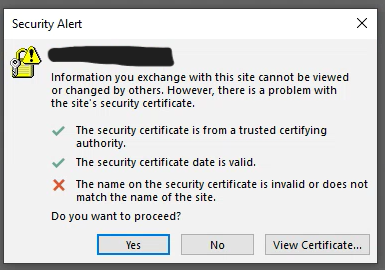
"The name on the security certificate is invalid..." After changing to trusted CA and updating VDs
Hello, This is with Exchange 2019. after changing the virtual directories to mail.domain.com (from mail.domain.local) and applying the appropriate certificate, when starting Outlook, the followi...

Dan_Snape
Feb 28, 2023Bronze Contributor
Sometimes there will be connections made using the server's hostname. Review your internal DNS MX records if you have any.
I'm not sure why the Autodiscover FQDN did that. I only know there is generally no need to change those settings. When the Outlook client is connected to the domain it will get the autodiscover URI via the SCP record (use Get-ClientService to view the URI details), not anything in the autodiscover virtual directory
I'm not sure why the Autodiscover FQDN did that. I only know there is generally no need to change those settings. When the Outlook client is connected to the domain it will get the autodiscover URI via the SCP record (use Get-ClientService to view the URI details), not anything in the autodiscover virtual directory
Lussy150
Mar 02, 2023Copper Contributor
Ok I.m quite certain now that the internal Autodiscover is causing the certificate mismatch. Of course it will lookup the SCP enty first, which is domain.local. So I guess somehow I need to change the SCP entry without breaking anything or create an internal autodiscover DNS record pointing to mail.domain.com.
- Lussy150Mar 24, 2023Copper ContributorWe ended up recreating the Autodiscover virtual directory. Which had partial success.
- Dan_SnapeMar 05, 2023Bronze ContributorYes...it's usually the Autodiscover record (SCP). I think that was my first response to your issue. Use the "Get-ClientAccessService | select *URI" and that will show you the current values for all your Exchange servers. Each Exchange server will have it's own record. The value should be a name that is on the certificate (ie https://autodiscover.domain.local/Autodiscover/Autodiscover.xml"). You can use the Set-ClientAccessService cmdlet to set the new value