Forum Discussion

Gmail to Microsoft 365 Migration Issue Open for 7+ Days – Seeking Guidance or Escalation Path
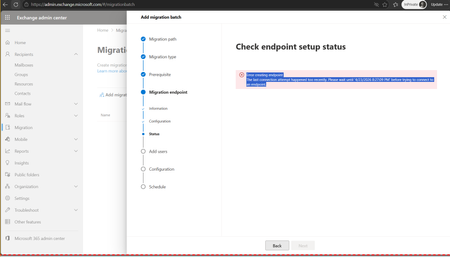

Gmail Migration Endpoint – Time-Sync Deadlock / Stale Endpoint (SR# if available)
Thanks for sharing the details and the screenshot. The error you're seeing is a well-known, classic MRS Proxy deadlock scenario with Gmail migrations. The future timestamp (4/23/2026 8:27:09 PM) is the giveaway. This is not a genuine "too many recent attempts" throttle — it's a symptom of one of two root causes:
1. A corrupt migration endpoint object on the tenant side, where a failed Test-MigrationServerAvailability attempt has left a stale time-stamp that the UI cannot clear.
2. A time-skew / clock-drift issue on the backend MRS instance handling the OAuth handshake with Google's IMAP/EWS endpoint, causing Google to reject the token as not-yet-valid.
The support ticket being open for 7+ days with generic responses means it hasn't reached the right engineer yet.
Here's exactly what you need to tell support to execute immediately (Exchange Online PowerShell, backend level):
Step 1 – Force-Remove the Stale Endpoint
The GUI/Admin Center can't touch this. They must run:
Get-MigrationEndpoint | Where-Object {$_.EndpointType -eq 'Gmail'} | Remove-MigrationEndpoint -Force -Confirm:$falseStep 2 – Verify Clean Removal
Get-MigrationEndpoint | fl Identity, EndpointType, StatusMake absolutely sure nothing with type Gmail remains before proceeding.
Step 3 – Manually Create a Fresh Endpoint (Bypass the Wizard)
New-MigrationEndpoint -Gmail -Name "GmailEP_Fresh" -EmailAddress "email address removed for privacy reasons" -NoBindingStep 4 – If It Still Fails
Ask them to escalate immediately to the MRS (Mailbox Replication Service) Product Group, specifically to check for backend time-skew on the MRS instance handling your tenant, and to review the failed OAuth token request. They have internal tools to force a re-sync of the MRS proxy clock. This is not something you can fix from the client side.
Escalation Path (If They Push Back)
· Reference your SR number and state: "This is a proven MRS deadlock. I'm requesting immediate escalation to the MRS PG or FastTrack Escalation engineering team. The standard UI troubleshooting path will not resolve this."
· If callback continues to be denied, open a new ticket directly via the Service Health Dashboard → Report an Issue, quote the original SR, and flag it as a service-impacting bug, not a user error.
Hope this helps cut through the queue. I've seen this exact scenario with IMAP/Gmail endpoints more times than I can count – the forced endpoint removal and fresh creation via PowerShell solves it 90% of the time, and the remaining 10% is always backend clock drift. Let me know how it goes.