Forum Discussion

Exchange 2016 CU23 sending complete but not receive.
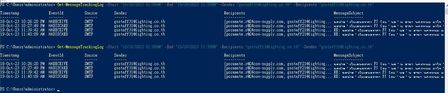

Hi LeonPavesic
Thanks for your reply.
I have checked.
1. The emails contain spam or malicious content.
PS C:\Users\administrator> Get-TransportAgent "Malware Agent"
Identity Enabled Priority
-------- ------- --------
Malware Agent False 5
2. The emails are being blocked by a mail flow rule.
Nothing in the rule.
3. The recipient mailbox is disabled or blocked
The mailbox is enabled and allowed.
The mailbox has free space.
Do you have any suggestions to help us solve this problem?

Hi Supanirun_R,
thanks for your update.
I'm glad to hear that you have checked the emails for spam and malicious content, the mail flow rules, and the recipient mailbox. Since you have found no issues with any of these items, you can try following steps:
1. Check Message Tracking Logs:
Revisit message tracking logs for additional clues or errors. This is the example for that.
Get-MessageTrackingLog -Start "10/18/2023 01:00AM" -End "10/19/2023 11:59PM" -Sender "email address removed for privacy reasons" -Recipients "email address removed for privacy reasons"2. Check Queue:
Check email queues in Exchange to check for issues in real-time.
To view the email queues, you can use the Get-Queue cmdlet. This cmdlet provides a list of all email queues on your Exchange server. For example:
Get-Queue 3. Server Logs:
Look for errors or warnings in your server's event logs.
4. External Factors:
Confirm DNS settings and check for issues with your domain's DNS records.
5. **Restart or /and Update**:
Try restarting your Exchange server and apply any available updates.
Please click Mark as Best Response & Like if my post helped you to solve your issue.
This will help others to find the correct solution easily. It also closes the item.
If the post was useful in other ways, please consider giving it Like.
Kindest regards,
Leon Pavesic
(LinkedIn)