Forum Discussion

mohemedd93
Dec 06, 2024Tin Contributor
Error unisntall exchange server
Hi teams, i have an error when i rty to uninstall exchange server : in role CAS at 70% Mailbox role: Client Access service FAILED: the iis admin service not start , and i delete all folder (o...
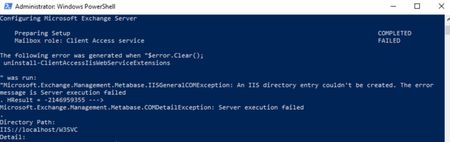

kyazaferr
Dec 11, 2024MCT
- Prepare for Clean Uninstall
- Backup all critical data
- Ensure no active mailboxes
- Verify no dependencies
- Use Exchange Uninstall Wizard with full cleanup option
Recommended Sequence:
- Stop all Exchange services
- Remove AD objects carefully
- Uninstall Exchange through Add/Remove Programs
- Clean up remaining files and registry entries
- Reboot server
 mohemedd93Dec 11, 2024Tin Contributor
thank you,
now i have another problem when i try to install exchange in the same server after uninstall :
i remove the file in c:\programfile\....\exchangeserver :
also i find thes services exchange :
any help
- kyazaferrDec 11, 2024MCT
Some steps you can try to resolve this issue:
- Check the IIS Admin Service: Ensure that the IIS Admin Service is running properly. You can try stopping and restarting the service using the PowerShell commands provided in the image.
- Clean up Exchange-related configurations: Remove any Exchange-specific IIS configurations, such as the WebDAVModule, using the provided PowerShell command.
- Verify Active Directory cleanup: Carefully remove any remaining Exchange-related objects from Active Directory using a tool like ADSI Edit.
- Repair Windows components: Reinstall the necessary Windows features, such as Web-Server, Web-Asp-Net45, and Web-Windows-Auth, to ensure the system is in a healthy state.
- Attempt a clean Exchange uninstallation: Before reinstalling Exchange, try to perform a clean uninstallation using the Exchange Uninstall Wizard, ensuring that you select the full cleanup option.
- Reboot the server: After completing the cleanup and uninstallation steps, reboot the server to ensure a fresh start.