Forum Discussion

pauljacobs
Jan 31, 2024Copper Contributor
Visual Basic No Longer Visible
I wanted to do two things with Visual Basic: 1) have the workbook open at a specific tab every time and 2) have a message pop up when the workbook opens. I went to Options>Customize Ribbon and a...

pauljacobs
Feb 01, 2024Copper Contributor
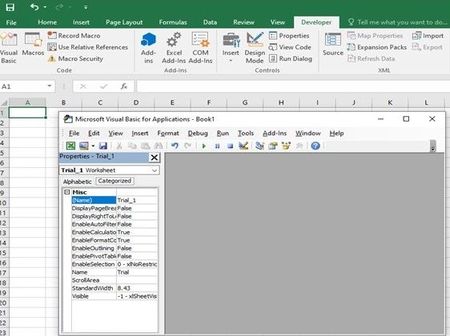
I already made the point about quotes. I was going in to correct them, having already figured out what you just mentioned, when I was faced with the view shown in the screenshot on my initial post.
I don't have a question about quotes.
I do need help though. Is it possible to bring your MVP abilities to bear on the question I actually asked?
Thanks

HansVogelaar
Feb 01, 2024MVP
Once you have displayed the Project Explorer window, double-click ThisWorkbook under the relevant workbook.
Copy code like this into the ThisWorkbook module:
Private Sub Workbook_Open()
    Worksheets("Specic Sheet").Select
    MsgBox "Hello There", vbInformation
End Sub
Switch back to Excel.
Save the workbook as a macro-enabled workbook (*.xlsm)