Forum Discussion

VBA to Move rows in a sheet based on the project Status


cascherfeld To paste values, move the destination to a new line and add the PasteSpecial argument:
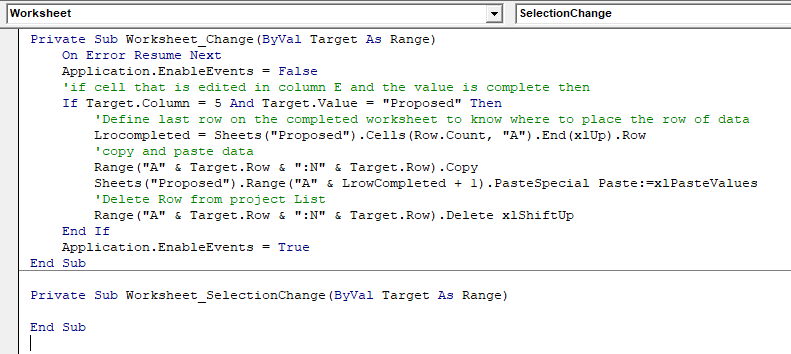
Range("A" & Target.Row & ":N" & Target.Row).Copy
Sheets("Meridian_Completed").Range("A" & LrowCompleted + 1).PasteSpecial Paste:=xlPasteValues
HTH

Thanks for the help! I am receiving a syntax error. Please advise if I have this correct...
- Smitty SmithOct 22, 2019Former Employee
cascherfeld The .PasteSpecial Paste:=xlPasteValues part needs to be on the same line.
The forum wrapped the text since I didn't post with code tags.
 Sway1034Feb 04, 2022Copper Contributor
Smitty Smith I followed the tips you provided above to cascherfeld and now coming across some issue. There seems to be no compile error with the code, but when I hit F5 to run it it brings out a macros pane which ask me to create a name and after I do it creates a module, but data doesn't move.
I also tried changing one of my Data sets to the indicator I'll be using which is "P", but the data did not move to the completed orders sheet.
Am I missing something? Any assistance is appreciated
 SerendipitousKNov 22, 2019Copper Contributor
Hello I have a similar situation as above and was able to get the code you helped them with to work for me for the most part . The issue I am running into is when I use this code it pastes on row 1 of the sheet I am directing it to so every time something moves from sheet 1 to sheet 2 it is pasting over my first row of information instead of the next blank row. I am not sure how to resolve this if you have any suggestions I would really appreciate it.
 BrandonDeen2005Dec 23, 2019Copper Contributor
Smitty Smith I was wondering if you got the issue resolved? I am having the same issue where I paste data into the spreadsheet and then it cuts row 2 and past to sheet 2.
- cascherfeldOct 22, 2019Copper Contributor