Forum Discussion

VBA Copy and Paste between workbooks
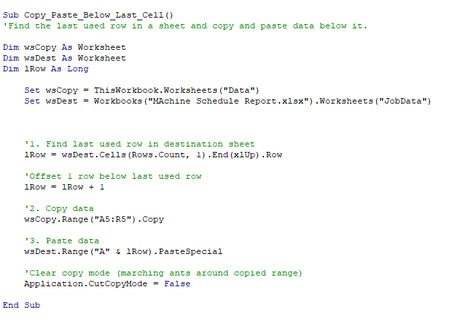

Here something on the fast untested (but should work):
Sub copy()
With Sheets("1")
.Range(.Cells(6, 2), .Cells(Rows.Count, 5)
.End(xlUp)).copy End With Sheets("2")
.Activate lastrow = Cells(Rows.Count, 2)
.End(xlUp).Row Range("B" & lastrow + 1)
.Select Selection.PasteSpecial xlPasteValues = xlPasteValues
End Sub
You can probably find what you're looking for here:
https://www.rondebruin.nl/win/s9/win005.htm
I would be happy to know if I could help.
Nikolino
I know I don't know anything (Socrates)
* Kindly Mark and Vote any reply if it helps please, as it will be beneficial to more Community members reading here.

Thank you so much for your response. I have just managed to get it working by specifying the PasteSpecial as PasteValues, as you have mentioned below. It turns out that it was quite an easy fix in the end!
Thanks again.
- NikolinoDENov 26, 2020Platinum Contributor
You are welcome 🙂
It has give me joy to be able to help you
Wish you a nice day.
Nikolino
I know I don't know anything (Socrates)