Forum Discussion

VBA code to copy & paste data as per Date Criteria
- Jan 03, 2022
Thanks, I see what is happening. Merged cells don't play nice with VBA. Try this version:
Private Sub CommandButton1_Click()
    Dim Rg As Range
    Set Rg = Me.UsedRange.Columns(1).Find(What:=Application.Text(Date, [A16].NumberFormat), LookIn:=xlValues)
    If Rg Is Nothing Then
        MsgBox "Today's Date Not Found. Please check the 'Date Received'"
    ElseIf Rg.Offset(0, 1).Value = "" Then
        Rg.Offset(0, 1).Resize(, 22).Value2 = [B16:W16].Value2
    ElseIf Rg.Offset(0, 1).Offset(1).Value = "" Then
        Rg.Offset(0, 1).Offset(1).Resize(, 22).Value2 = [B16:W16].Value2
    ElseIf Rg.Offset(0, 1).Offset(2).Value = "" Then
        Rg.Offset(0, 1).Offset(2).Resize(, 22).Value2 = [B16:W16].Value2
    Else
        MsgBox "All three times have been filled!"
    End If
    Application.CutCopyMode = False
End Sub

For example
Private Sub CommandButton1_Click()
    Dim Rg As Range
    Set Rg = Me.UsedRange.Columns(1).Find(Application.Text(Date, [A16].NumberFormat), [A17], xlValues)
    If Rg Is Nothing Then
        MsgBox "Today's Date Not Found. Please check the 'Date Received'"
    Else
        Rg(1, 2).Resize(, 22).Value2 = [B16:V16].Value2
        Rg(2, 2).Resize(, 22).Value2 = [B16:V16].Value2
        Application.CutCopyMode = False
    End If
End Sub
Hi Hans,
Much appreciated for your time.
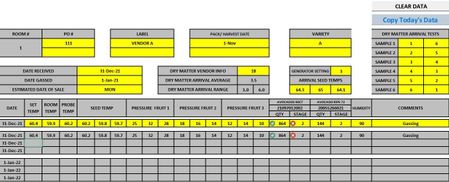
This will kind of help me if there is no other option but i am looking for the options to copy & Paste data following row (in Blue color) three times a day where we are updating the row there times a day ( Like Morning, afternoon and night. So reason why we are copying & paste data to keep tracking as per date so, we can plan ripening fruit accordinlgy the fruit behaving in terms of ripeness.
So, is it possible to copy & paste data (data in blue-above picture) three time a day where if there is data in 1 row then should go to next and if there is data on second row then should copy data on 3rd day matching date criteria in column 1.
Hope, i am able to explain my scenario.
Thank you,
- HansVogelaarJan 02, 2022MVP
Does this do what you want?
Private Sub CommandButton1_Click() Dim Rg As Range Set Rg = Me.UsedRange.Columns(1).Find(What:=Application.Text(Date, [A16].NumberFormat), LookIn:=xlValues) If Rg Is Nothing Then MsgBox "Today's Date Not Found. Please check the 'Date Received'" ElseIf Rg.Offset(0, 1).Value = "" Then Rg.Offset(0, 1).Resize(, 22).Value2 = [B16:V16].Value2 ElseIf Rg.Offset(1, 1).Value = "" Then Rg.Offset(1, 1).Resize(, 22).Value2 = [B16:V16].Value2 ElseIf Rg.Offset(2, 1).Value = "" Then Rg.Offset(2, 1).Resize(, 22).Value2 = [B16:V16].Value2 Else MsgBox "All three times have been filled!" End If Application.CutCopyMode = False End Sub- doit_2729Jan 03, 2022Copper Contributor
Thank You again.
Much appreciated.
Yes, this what i was looking for but some reason data is copying in to line not in order when you click 2nd time and 3rd time. See the attached below. ( i have also attached my file here as well)I don't have words to express my gratutide, this is great help to me.
Thank you again for all your help.
- HansVogelaarJan 03, 2022MVP
Thanks, I see what is happening. Merged cells don't play nice with VBA. Try this version:
Private Sub CommandButton1_Click()
    Dim Rg As Range
    Set Rg = Me.UsedRange.Columns(1).Find(What:=Application.Text(Date, [A16].NumberFormat), LookIn:=xlValues)
    If Rg Is Nothing Then
        MsgBox "Today's Date Not Found. Please check the 'Date Received'"
    ElseIf Rg.Offset(0, 1).Value = "" Then
        Rg.Offset(0, 1).Resize(, 22).Value2 = [B16:W16].Value2
    ElseIf Rg.Offset(0, 1).Offset(1).Value = "" Then
        Rg.Offset(0, 1).Offset(1).Resize(, 22).Value2 = [B16:W16].Value2
    ElseIf Rg.Offset(0, 1).Offset(2).Value = "" Then
        Rg.Offset(0, 1).Offset(2).Resize(, 22).Value2 = [B16:W16].Value2
    Else
        MsgBox "All three times have been filled!"
    End If
    Application.CutCopyMode = False
End Sub