Forum Discussion

VBA Code for List Box Change
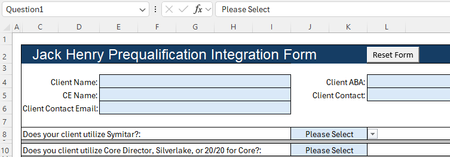

Target is an argument of Worksheet_Change, but it is not known in Question1Mac. And Visible is not a property of a row/column. You must use the Hidden property.
Try
Private Sub Worksheet_Change(ByVal Target As Range)
    If Not Intersect(Range("Question1"), Target) Is Nothing Then
        Application.ScreenUpdating = False
        Application.EnableEvents = False
        Range("A10:A13").EntireRow.Hidden = (Range("Question1").Value = "Yes")
        Application.EnableEvents = True
        Application.ScreenUpdating = True
    End If
End Sub
 mzeller1776Apr 24, 2025Brass Contributor
Thank you. I was able to get this to work after making the above changes. When I tried to go in this morning and do something similar with the second question (if yes, go to the fifth question, if no, display a msgbox). I wasn't sure if I could just copy the code for the first question ("If Not"...to "End If"), and change Question1 to Question 2 and modify the Range to be the appropriate rows. It didn't like it. I removed the code so it looks just like above and now that is now working either. When I select Yes or No for Question1 it changes to Yes or No, but nothing happens. I can't determine what changed to stop it from working. Any ideas? And when I go to add the code for Question2 do I add it to this same Private Sub or do I have to create a new one? Here is screenshot of my page/code right now.
- HansVogelaarApr 24, 2025MVP
I don't see a screenshot (it's probably the forum, not you).
There can be only one Worksheet_Change event procedure in the worksheet module.
You can add a section for each question:
Private Sub Worksheet_Change(ByVal Target As Range)
    If Not Intersect(Range("Question1"), Target) Is Nothing Then
        Application.ScreenUpdating = False
        Application.EnableEvents = False
        Range("A10:A13").EntireRow.Hidden = (Range("Question1").Value = "Yes")
        Application.EnableEvents = True
        Application.ScreenUpdating = True
    End If
    If Not Intersect(Range("Question2"), Target) Is Nothing Then
        Application.ScreenUpdating = False
        Application.EnableEvents = False
        Range("A15:A18").EntireRow.Hidden = (Range("Question2").Value = "Yes")
        Application.EnableEvents = True
        Application.ScreenUpdating = True
    End If
    If Not Intersect(Range("Question3"), Target) Is Nothing Then
        Application.ScreenUpdating = False
        Application.EnableEvents = False
        Range("A20:A23").EntireRow.Hidden = (Range("Question3").Value = "Yes")
        Application.EnableEvents = True
        Application.ScreenUpdating = True
    End If
    ' ...
End Sub
You'll have to change the ranges, of course.
But if you have many questions, that quickly becomes tedious. As an alternative, create a procedure in the same module with two arguments:
Private Sub Worksheet_Change(ByVal Target As Range)
    HandleQuestion "Question1", "A10:A13"
    HandleQuestion "Question2", "A15:A18"
    HandleQuestion "Question3", "A20:A23"
    ' ...
End Sub

Private Sub HandleQuestion(q As String, r As String)
    If Not Intersect(Range(q), Target) Is Nothing Then
        Application.ScreenUpdating = False
        Application.EnableEvents = False
        Range(r).EntireRow.Hidden = (Range(q).Value = "Yes")
        Application.EnableEvents = True
        Application.ScreenUpdating = True
    End If
End Sub
If all questions have a range named Questionn and if the rows to be hidden follow a fixed pattern, this could be streamlined even further.
- mzeller1776Apr 25, 2025Brass Contributor
Got it to work. For whatever reason I had to create a blank xlsm workbook and redo everything. Thanks.