Forum Discussion

VBA Code: ensuring users fill out specific cells
- Dec 19, 2024
A workaround I used recently with a client was to utilize conditional formatting to indicate when a record was incomplete.
This is exactly what I was going to suggest. Just create a cell off to the right (or left (or both)) that is red until each cell has content. The VBA solution, even if it can be made to work, is overkill.
Of course, unless you're using Data Validation as well, it's possible that one or more of the cells may have invalid data. But I'm also assuming that the omissions you're experiencing are inadvertent and that, in fact, all your colleagues need is the kind of reminder that the Red conditionally formatted cell would provide.


Does this do what you want?
Private Sub Workbook_BeforeSave(ByVal SaveAsUI As Boolean, Cancel As Boolean)
    If Not IsTableComplete() Then
        MsgBox "You must complete the entire row in the table before saving.", vbCritical, "Incomplete Data"
        Cancel = True
    End If
End Sub

Private Sub Workbook_BeforeClose(Cancel As Boolean)
    If Not IsTableComplete() Then
        MsgBox "You must complete the entire row in the table before closing.", vbCritical, "Incomplete Data"
        Cancel = True
    End If
End Sub

Function IsTableComplete() As Boolean
    Dim ws As Worksheet
    Dim tbl As ListObject
    Dim row As ListRow

    ' Set the worksheet and table name (update "Sheet1" and "Table1" to match your spreadsheet)
    Set ws = ThisWorkbook.Worksheets("Sheet2")
    Set tbl = ws.ListObjects("Table14")

    IsTableComplete = True ' Default to complete

    ' Check if any row is fully filled out
    For Each row In tbl.ListRows
        Dim cell As Range
        For Each cell In row.Range
            If IsEmpty(cell.Value) Then
                IsTableComplete = False
                Exit Function
            End If
        Next cell
    Next row
End Function

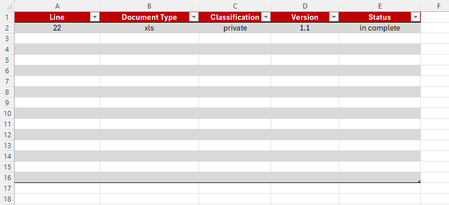
Hi, so this us as far as I got when I first started to create this document. So, in a way it does work, but the table has to be only as long as the last piece of data,
i.e. i can't have a pre-made table of 14 rows, because the code will then force the document to not save or close unless the last row of the table (row 14) is filled out.
I wanted to have a document set up ready for the many workers to open it, start filling in their row and each column, and then if they went to shut down the document and they haven't filled in all the cells in the row they started to fill out, a warning message would pop up and stop them from closing it....
- HansVogelaarDec 19, 2024MVP
I don't see how I could make that work.