Forum Discussion

Using multiple ranges
- Apr 15, 2025
Select rows 159:162.
Click in the name/address box on the left-hand side of the formula bar.
Type CVVINFO and press Enter.
Select C157.
Click in the name/address box on the left-hand side of the formula bar.
Type CVVINFO_Cell and press Enter.
Select rows 99:105.
Click in the name/address box on the left-hand side of the formula bar.
Type BINBalInfo and press Enter.
Select C97.
Click in the name/address box on the left-hand side of the formula bar.
Type BINBalInfo_Cell and press Enter.
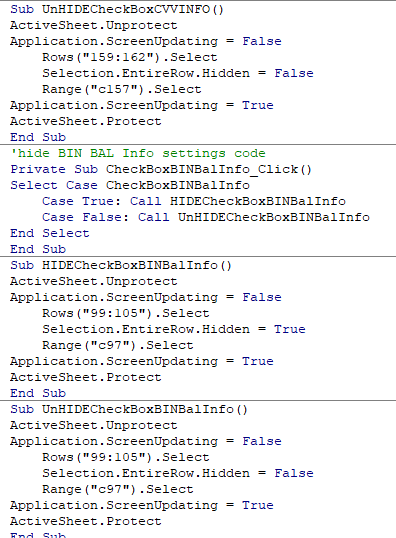
In the code, replace:
159:162 with CVVINFO
C157 with CVVINFO_Cell99:105 with BINBalInfo
C97 with BINBalInfo_Cell

Select rows 159:162.
Click in the name/address box on the left-hand side of the formula bar.
Type CVVINFO and press Enter.
Select C157.
Click in the name/address box on the left-hand side of the formula bar.
Type CVVINFO_Cell and press Enter.
Select rows 99:105.
Click in the name/address box on the left-hand side of the formula bar.
Type BINBalInfo and press Enter.
Select C97.
Click in the name/address box on the left-hand side of the formula bar.
Type BINBalInfo_Cell and press Enter.
In the code, replace:
159:162 with CVVINFO
C157 with CVVINFO_Cell
99:105 with BINBalInfo
C97 with BINBalInfo_Cell