Forum Discussion

Angel_777_1
Apr 27, 2022Copper Contributor
Using Find & Replace Feature
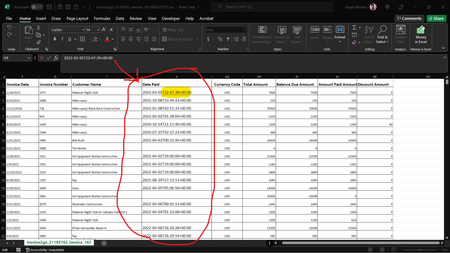
Hello ALL. I need help. I'm having a complete brain lockout. Ok, so some would call it a "Brain Fart", but in my case, "its Bonlde Moment"! lol Ok, so what I need to do is use the Find & Replace fea...

HansVogelaar
Apr 27, 2022MVP
Select from V2 down to the last used row.
Press Ctrl+H to activate the Replace dialog.
Click 'Options >>'.
Make sure that the 'Match entire cell contents' check box is clear.
Enter T* in the 'Find what' box, and leave the 'Replace with' box empty.
Click 'Replace All'.
To convert the result to 'real' dates, if Excel doesn't do that automatically:
Click 'Text to Columns' on the Data tab of the ribbon.
Click 'Next >' twice.
Select Date, and select YMD from the drop-down next to it.
Click Finish.