Forum Discussion

Use VBA to Autofill a Row until the end of the number of data in another row
 Mar 24, 2019
Hi Haytham Amairah,
I was facing similar issues and chanced upon this thread. If i have two columns (O and P) that i wish to autofill via VBA, do I amend the code from:
Selection.AutoFill Destination:=Range("O2:P313")
Range("O2:P313").Selectto:
Selection.AutoFill Destination:=Range("O2:O" & Range("E" & Rows.Count).End(xlUp).Row)
Range(Selection, Selection.End(xlDown)).Select
Selection.AutoFill Destination:=Range("P2:" & Range("E" & Rows.Count).End(xlUp).Row)
Range(Selection, Selection.End(xlDown)).Select

Hi Haitham
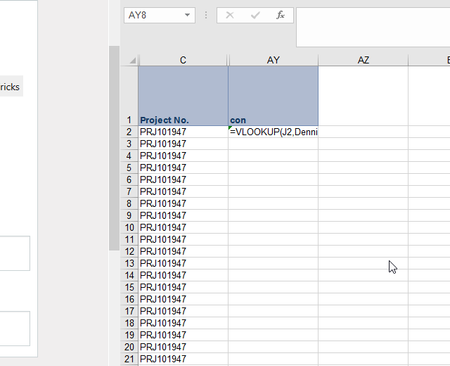
I am new to VBA and I am trying to amend the ActiveCell.End(xlDown) part so that the formula (in column A) stops at the last row that contains data in column A. and again starts to autofill from this column to the next contains data and goes on,
and thank you in advance.
this is a screenshot:
Sub autofill()
Dim Wad As String
Wad = Cells(Rows.Count, "A").End(xlUp).Row
Range("A30").Select
Selection.autofill Destination:=Range("A30:A" & Range("A" & Rows.Count).End(xlDown).Row)
Range(Selection, Selection.End(xlUp)).Select
Selection.autofill Destination:=Range("wad:A" & Range("A" & Rows.Count).End(xlDown).Row)
Range(Selection, Selection.End(xlUp)).Select
End Sub
Waddah

Hi Waddah,
Sorry for the late reply, but I need some clarifications as column A seems to have no formulas in it!
If you can attach the worksheet here, that would be better.
Regards