Forum Discussion

k_hoover
Apr 24, 2023Copper Contributor
Update inputs from different sheets based on data in different cells
I hope I can explain this in a way that makes sense. I have an established workbook with what is essentially a "master" and "sub" worksheets, where the master contains every bit of data contained wit...
 Apr 24, 2023
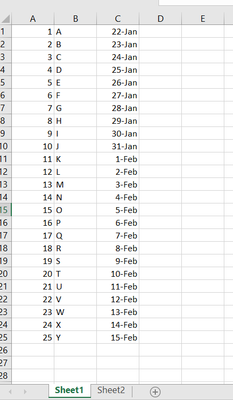
=INDEX(Sheet1!C:C,MATCH(1,(Sheet2!A1=Sheet1!A:A)*(Sheet2!B1=Sheet1!B:B),0))You can try this formula. Enter the formula with ctrl+shift+enter if you don't work with Office 365 or Excel 2021.
Sheet1:
Sheet2:
OliverScheurich
Apr 24, 2023Gold Contributor
=INDEX(Sheet1!C:C,MATCH(1,(Sheet2!A1=Sheet1!A:A)*(Sheet2!B1=Sheet1!B:B),0))You can try this formula. Enter the formula with ctrl+shift+enter if you don't work with Office 365 or Excel 2021.
Sheet1:
Sheet2:

k_hoover
Apr 24, 2023Copper Contributor
That worked. Thank you. I would have never gotten to INDEX.