Forum Discussion

Deleted
Jun 26, 2018Not applicable
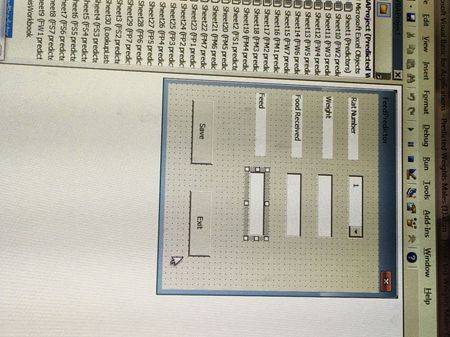
Trying to create a GUI that can save input values and output values based on inputs into a sheet
Hi all, I'm completely new to working with VBA. I work in a rat lab and I'm trying to create a GUI that will allow a user to input three things: rat number, how much they weight, and how much foo...
- Jun 27, 2018
Hey Laura-
Hope that you're doing well. Maybe you could try doing something like this (See attached file for reference):
Private Sub cmdExit_Click()
    'Close PredictFeed
    Unload Me
End Sub

Private Sub cmdSave_Click()

    Dim lo As ListObject
    Dim ws As Worksheet
    Dim arrData As Variant
    Dim NewLstRow As ListRow

    'Int() forces an Integer CDbl() forces a Double
    arrData = Array(Date, Int(Me.cboRatNum), CDbl(Me.txtWeight), CDbl(Me.txtFoodRec))

    'Define worksheet
    Set ws = ActiveSheet

    ' Get reference to table
    Set lo = ws.ListObjects("tblRatData")  ' <--- Update this with your table name

    'Add List Object Row
    Set NewLstRow = lo.ListRows.Add(AlwaysInsert:=True)

    'Put Data in Row
    NewLstRow.Range = arrData

End Sub

Private Sub txtFoodRec_Exit(ByVal Cancel As MSForms.ReturnBoolean)

    With Me
        If .cboRatNum.Value = "" Or .txtWeight = "" Or .txtFoodRec = "" Then
            'Do Nothing...
            Exit Sub
        Else
            'Update Feed Amount in Form when last value has been filled in
            .txtFeedAmount = 300 - CDbl(.txtFoodRec)

        End If
    End With
End Sub

Private Sub UserForm_Initialize()

    Dim intLp As Integer

    'Load cboRatNumber with values....
    For intLp = 1 To 28
        Me.cboRatNum.AddItem intLp
    Next intLp

End Sub

Matt Mickle
Jun 27, 2018Bronze Contributor
Hey Laura-
Hope that you're doing well. Maybe you could try doing something like this (See attached file for reference):
Private Sub cmdExit_Click()
    'Close PredictFeed
    Unload Me
End Sub

Private Sub cmdSave_Click()

    Dim lo As ListObject
    Dim ws As Worksheet
    Dim arrData As Variant
    Dim NewLstRow As ListRow

    'Int() forces an Integer CDbl() forces a Double
    arrData = Array(Date, Int(Me.cboRatNum), CDbl(Me.txtWeight), CDbl(Me.txtFoodRec))

    'Define worksheet
    Set ws = ActiveSheet

    ' Get reference to table
    Set lo = ws.ListObjects("tblRatData")  ' <--- Update this with your table name

    'Add List Object Row
    Set NewLstRow = lo.ListRows.Add(AlwaysInsert:=True)

    'Put Data in Row
    NewLstRow.Range = arrData

End Sub

Private Sub txtFoodRec_Exit(ByVal Cancel As MSForms.ReturnBoolean)

    With Me
        If .cboRatNum.Value = "" Or .txtWeight = "" Or .txtFoodRec = "" Then
            'Do Nothing...
            Exit Sub
        Else
            'Update Feed Amount in Form when last value has been filled in
            .txtFeedAmount = 300 - CDbl(.txtFoodRec)

        End If
    End With
End Sub

Private Sub UserForm_Initialize()

    Dim intLp As Integer

    'Load cboRatNumber with values....
    For intLp = 1 To 28
        Me.cboRatNum.AddItem intLp
    Next intLp

End Sub
- DeletedJun 29, 2018Not applicable
Matt,
Thanks very much for your help with fixing my code. This works great.