Forum Discussion

Sum returns 0 and seems not to recognice the value.
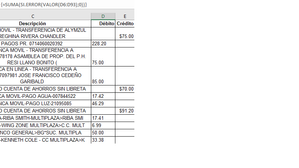

Hi Jose
Thanks for the screen shots, it helps to see the problem!
From your first image, it appears that your Debito column is Text, therefore the SUM formula will not work.
Can I suggest the following:
- Select columns D and E.
- In the Home tab under the Number section, drop down the list and select Currency.
- Both columns should now reflect $ currency values and your SUM formula (e.g. =SUM(D2:D13)) should work now.
See if this works for you?
I've also attached a sample file for you to see the formula and format in action, so you can have a play with it if you want.
Please let us know how you go.
Cheers
Damien
 jose cedeñoFeb 13, 2018Copper Contributor
Hi Damien, it seems to have something to do with the source I guess because I've tried everything already and wouldn't work. do you know how to change the confidence options, that's the only thing I haven't done yet.
- SergeiBaklanFeb 13, 2018Diamond Contributor
It looks like unprintable characters are columns since the source is copy/pasted from internet, e.g.
228.20&CHAR(10) in D3.
If so array formula
=SUM(IFERROR(VALUE(CLEAN(D6:D93)),0))
could help
- jose cedeñoFeb 13, 2018Copper Contributor
Hello, at least now with the clean function it shows numbers but still giving me back error and since the formula state if error is 0 turns everything in 0.here is the formula is in spanish but I'm sure the functions are correctshowing the valuesshowing the error

