Forum Discussion

sum of two drop down lists
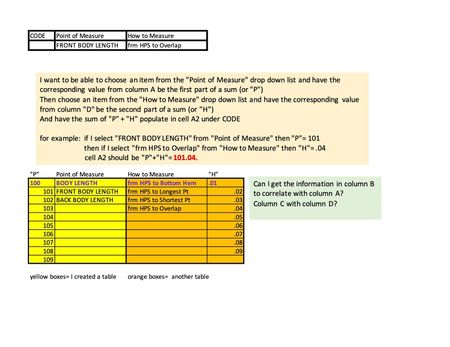
- May 09, 2023
Yes, that makes all the difference! XLOOKUP is only available in Microsoft 365 and Office 2021, not in Office 2019.
Try this formula instead:
=IF(B13="",0,INDEX(BL[BL'#],MATCH(B13,BL[BL DESCRIPTION],0)))+IF(C13="",0,INDEX(BLHTM[HTM'#],MATCH(C13,BLHTM[HTM DESCRIPTION],0)))
Workbook with this formula attached.

Hi Hans,
Thank you for responding. I have further questions and will be repeating previous info for clarity. (apologies for redundant information. I am not good with this.)
There is a number populating the the desired cell, but the sum is not correct. This is what I did:
in cell A2 (which reads 0)- the formula I entered is:
=IFERROR(XLOOKUP(B13,BL[BL DESCRIPTION],BL[BL'#])+XLOOKUP(C13,BLHTM[HTM DESCRIPTION],BLHTM[HTM'#]),)
Cell B2 (where it says FRONT BODY LENGTH) is a drop down list linked to BL description column in ORANGE CHART
Cell B3 (where it says HPS to Skirt Overlap) is a drop down list linked to HTM description column in BLUE CHART.
You advised : =IFERROR(XLOOKUP(B2, B10:B20, A10:A20)+XLOOKUP(C2, C2:C10, D2:D10), "")
I followed the layout, but my data for the charts/drop down lists are located in another sheet. And omitted "". When "" are added, nothing populates.
These are my data charts:
ORANGE is BL chart
BLUE is HTM chart
My desired result is to have cell A2 read 101.04 when the formula is correct.
Thank you for your time.

Could you attach a small sample workbook demonstrating the problem (without sensitive data), or if that is not possible, make it available through OneDrive, Google Drive, Dropbox or similar?
- feistybMay 08, 2023Tin Contributor
Yes, please see attached. Tabs/sheets are highlighted in green and red.
The data charts are in red "data set(DO NOT USE PRINT)" tab
The cells that I want to populate using formula are in green "GRADED SPEC" tab.
If there is anything else I can make clearer for you, pls let me know.
Again, thank you for your time!
- HansVogelaarMay 08, 2023MVP
Does this do what you want?
- feistybMay 08, 2023Tin ContributorUnfortunately, no.
I am not able to select other options in the drop down lists and have them sum correctly/without error.