Forum Discussion

sum of two drop down lists
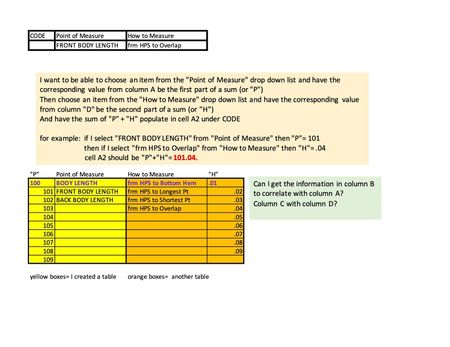
- May 09, 2023
Yes, that makes all the difference! XLOOKUP is only available in Microsoft 365 and Office 2021, not in Office 2019.
Try this formula instead:
=IF(B13="",0,INDEX(BL[BL'#],MATCH(B13,BL[BL DESCRIPTION],0)))+IF(C13="",0,INDEX(BLHTM[HTM'#],MATCH(C13,BLHTM[HTM DESCRIPTION],0)))
Workbook with this formula attached.

Let's say that your lookup tables are in A10:D20.
In A2:
=IFERROR(XLOOKUP(B2, B10:B20, A10:A20)+XLOOKUP(C2, C2:C10, D2:D10), "")

Hi Hans,
Thank you for responding. I have further questions and will be repeating previous info for clarity. (apologies for redundant information. I am not good with this.)
There is a number populating the the desired cell, but the sum is not correct. This is what I did:
in cell A2 (which reads 0)- the formula I entered is:
=IFERROR(XLOOKUP(B13,BL[BL DESCRIPTION],BL[BL'#])+XLOOKUP(C13,BLHTM[HTM DESCRIPTION],BLHTM[HTM'#]),)
Cell B2 (where it says FRONT BODY LENGTH) is a drop down list linked to BL description column in ORANGE CHART
Cell B3 (where it says HPS to Skirt Overlap) is a drop down list linked to HTM description column in BLUE CHART.
You advised : =IFERROR(XLOOKUP(B2, B10:B20, A10:A20)+XLOOKUP(C2, C2:C10, D2:D10), "")
I followed the layout, but my data for the charts/drop down lists are located in another sheet. And omitted "". When "" are added, nothing populates.
These are my data charts:
ORANGE is BL chart
BLUE is HTM chart
My desired result is to have cell A2 read 101.04 when the formula is correct.
Thank you for your time.
- HansVogelaarMay 08, 2023MVP
Could you attach a small sample workbook demonstrating the problem (without sensitive data), or if that is not possible, make it available through OneDrive, Google Drive, Dropbox or similar?
- feistybMay 08, 2023Tin Contributor
Yes, please see attached. Tabs/sheets are highlighted in green and red.
The data charts are in red "data set(DO NOT USE PRINT)" tab
The cells that I want to populate using formula are in green "GRADED SPEC" tab.
If there is anything else I can make clearer for you, pls let me know.
Again, thank you for your time!
- HansVogelaarMay 08, 2023MVP
Does this do what you want?