Forum Discussion

oteixeira62
Jan 14, 2023Copper Contributor
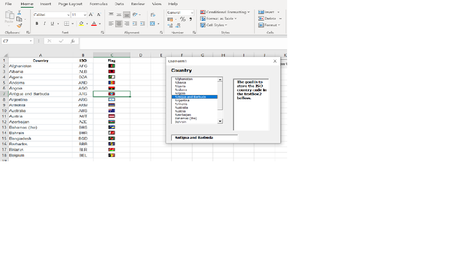
Store select item from listbox to textbox
I have this UserForm with a listbox of items stored in Sheet, column A. Whenever I select a country from the listbox, the country name is displayed in the textbox bellow the countries list. My goal ...
- Jan 14, 2023
Set the ColumnCount property of the list box to 2.
In the UserForm_Initialize procedure, change
ListBox1.List = Sheets("Sheet1").Range("A2:A" & Cells(Rows.Count, 2).End(xlUp).Row).Valueto
ListBox1.List = Sheets("Sheet1").Range("A2:B" & Cells(Rows.Count, 2).End(xlUp).Row).ValueIn the ListBox1_Change procedure, change
If ListBox1.Selected(k) Then TextBox2.Value = ListBox1.Textto
If ListBox1.Selected(k) Then TextBox2.Value = ListBox1.Column(1)

HansVogelaar
Jan 14, 2023MVP
Set the ColumnCount property of the list box to 2.
In the UserForm_Initialize procedure, change
ListBox1.List = Sheets("Sheet1").Range("A2:A" & Cells(Rows.Count, 2).End(xlUp).Row).Valueto
ListBox1.List = Sheets("Sheet1").Range("A2:B" & Cells(Rows.Count, 2).End(xlUp).Row).Value
In the ListBox1_Change procedure, change
If ListBox1.Selected(k) Then TextBox2.Value = ListBox1.Textto
If ListBox1.Selected(k) Then TextBox2.Value = ListBox1.Column(1)
oteixeira62
Jan 14, 2023Copper Contributor
Thank You very much Hans!
That works perfectly.
Octavio
That works perfectly.
Octavio