Forum Discussion

Sorting list of values by adjacent column text
 Feb 25, 2022
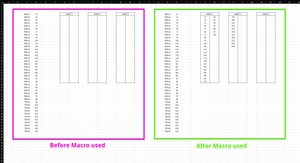
Sub sort() Dim i As Integer Dim j As Integer Dim z As Integer Dim w As Integer Range("G5:MM27").Clear w = 7 z = 0 j = 5 For i = 4 To 300 If Cells(i + 1, 3).Value = Cells(i, 3).Value Then If z = 23 Then If w Mod 3 = 1 Then w = w + 1 ElseIf w Mod 3 = 2 Then w = w + 2 End If j = 5 Cells(j, w).Value = Cells(i, 4).Value j = j + 1 z = 1 Else Cells(j, w).Value = Cells(i, 4).Value j = j + 1 z = z + 1 End If Else If z = 23 Then If w Mod 3 = 1 Then w = w + 1 Else End If j = 5 Cells(j, w).Value = Cells(i, 4).Value Else Cells(j, w).Value = Cells(i, 4).Value If w Mod 3 = 1 Then w = w + 3 Else w = w + 2 End If j = 5 z = 0 End If End If Next i End SubMaybe with these lines of code which seem to work in my spreadsheet. Click the button in cell S2 to start the macro. The macro currently works for entries in range C4:C300 and can easily be adapted to other ranges.

Hi there,
Yea I could use cell formulas if that works. The cell formula would need to work on a much larger scale though then what I have shown as an example. That was why I was thinking vba macros may be better suited?
Hopefully the link below works for you, the folder contains the example I have shown on the original post. I cant use an actual example as the document would contain company IP.
https://textormetal.sharepoint.com/:f:/s/Hytek/EjyZ4vmTMQVGoOzGXjzkt9cB2adRt3JiI3HFmnk4jAqclQ?e=nohZen

Hello.
I'm not sure what the selection criteria is. Do the values in column D change. so far I just went and
=D17down the first column as that is 23 lines as per original instructions.
- camerongreenfieldFeb 25, 2022Copper ContributorWildecoyote1966
Yes both column C and D would have their values change as the values will be copied in from another workbook.
The cell values down column C represent the "group" that the values in column D belong to. That's why S8 and S9 cannot be on the same sheet as one is in the walls "group" and the other is in the truss "group". S8 would follow S7 on the sheet list (unless there is no more cells for that sheet list, in which case it would go onto the next sheet). S9 would go onto the next available sheet regardless as it is the start of a new "group". Hope that makes sense.- Wildecoyote1966Feb 25, 2022Brass Contributor
Like I said the column G is 23 lines long
I would try something like at G5
=IF(C4="Walls",D4,"")at J5
=IF(C4="Truss",D4,"")if you the name in column D changes say from Walls to Truss you would get a blank cell in that line.